WordPress powers roughly 41% of every website on the internet (WPZOOM, August 2026). For most of those sites, media is the single biggest thing weighing down the server: images, videos, and PDFs, sitting in wp-content/uploads and growing every week. The new Hippius Media Offloader plugin moves that media off the server entirely, onto Hippius. It's S3-compatible storage, distributed across an independent network instead of sitting in one company's data center.
If you're already comfortable with the idea of offloading media to cloud storage, the pitch here is simple: it's the same S3-compatible workflow you'd expect from Amazon S3. The difference is what's underneath: infrastructure built to be checked rather than just trusted. There are no egress fees quietly eating into what you save once that offloaded media actually gets served to visitors.
The plugin was built for Hippius by I-Genesys, a WordPress development agency.
What Is the Hippius Media Offloader?
Hippius Media Offloader is a free WordPress plugin that migrates your media library, existing files and new uploads alike, to Hippius. Instead of piling up in your server's local storage, images, videos, and documents are stored on Arion, Hippius's own storage engine. They're served back to visitors through a Hippius URL.
The plugin talks to Hippius through the S3 API, the same interface developers use for Amazon S3. That matters for a practical reason: there's no proprietary SDK to learn and no unfamiliar configuration. If you've ever pointed a WordPress site at any object storage provider before, the setup will feel familiar.
It's a useful option for the same reasons people reach for self hosted cloud storage more broadly. You keep control of your own site and hosting, but stop asking your server to store and serve every media file you've ever uploaded. Hippius is also one of a growing number of object storage providers built around the standard S3 API rather than a closed system. Moving to it, or away from it later, doesn't mean rewriting how your site works.
Key Features
- Bulk and automatic migration. Move your entire existing library in one operation, or let new uploads offload themselves in the background.
- Transparent URL replacement. Media links in existing posts and pages are updated automatically; nothing breaks on the front end.
- Keep local copies, or don't. Retain original files as a backup during your first migration, then free up server disk space once you've verified everything works.
- A single migration dashboard. Track total files, migrated files, storage used, and any failed uploads from one screen inside WordPress admin, without digging through server logs.
- Standard S3-compatible object storage. No proprietary format. The plugin works with the same S3 API used by Amazon S3 and other s3 compatible object storage services, so credentials, buckets, and endpoints all behave the way they would with any object storage provider.
What Does Hippius Storage Cost?
Hippius bills per use from your account balance rather than a flat monthly plan. S3 Compatible storage runs pay-as-you-go at $6/TB per month, roughly $0.006/GB. There's no long-term contract to sign, and full, current rates are always at hippius.com/pricing. If you're comparing amazon s3 alternatives on price, the storage rate itself usually isn't where the real difference shows up: it's egress. Many providers charge separately to move data back out. That's the cost that creeps up once your offloaded media is actually being served to visitors. Hippius doesn't charge for egress, so serving migrated media doesn't add a second, unpredictable line item on top of what you're already paying for storage.
Setting Up the Hippius Media Offloader
Setup takes about ten minutes, and most of it happens right inside WordPress admin. At a glance, it comes down to four moves: connect your credentials, point the plugin at a bucket, migrate what's already there, then turn on auto-migration for what's next.
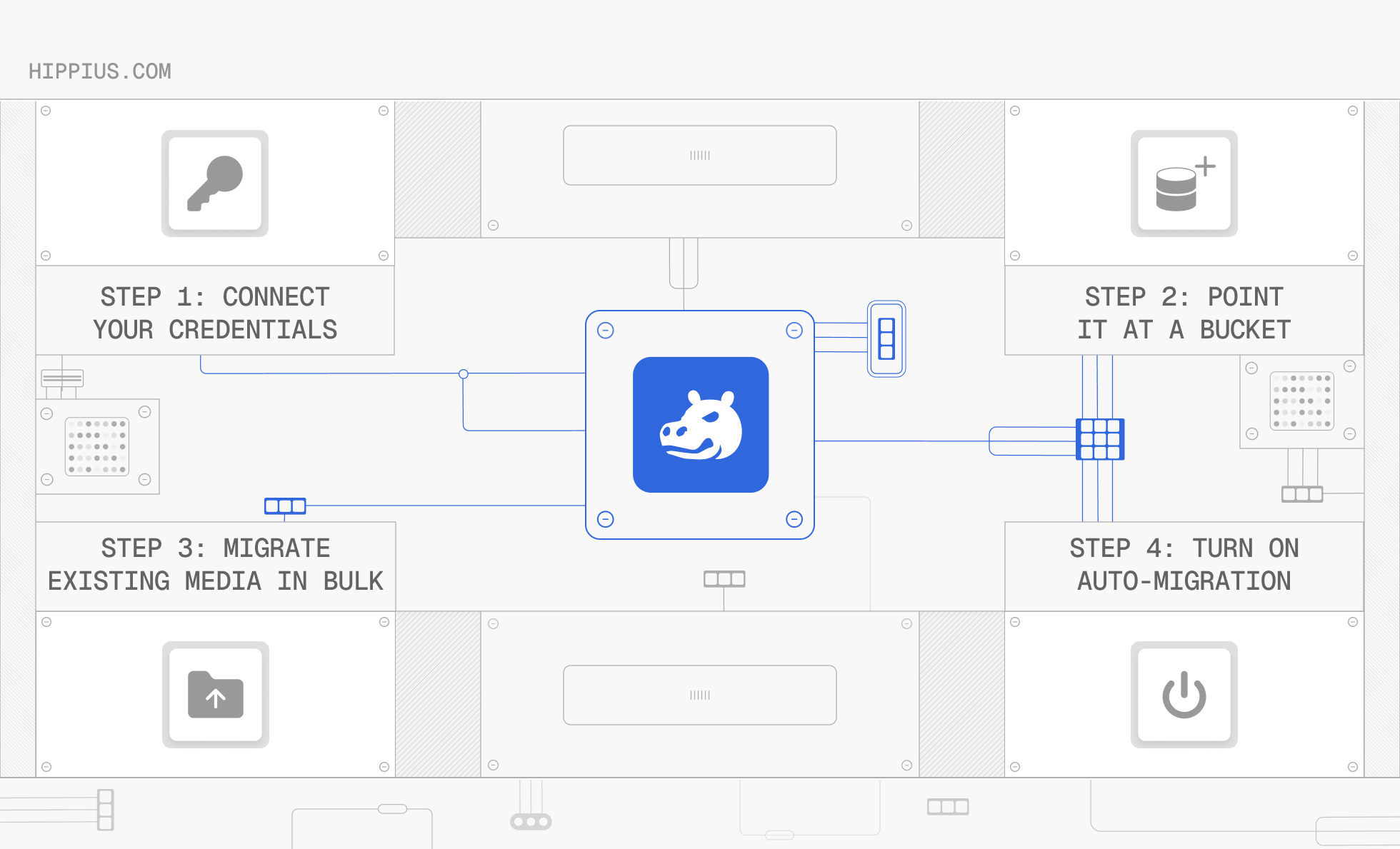
That's the general shape of it. For the exact configuration steps in the plugin itself:
- Install the plugin from the WordPress plugin directory, or upload it manually, and activate it from the Plugins page.
- Enter your S3 credentials. Go to Hippius Media → Settings and enter your Access Key ID and Secret Access Key, generated from a free Hippius account after adding to your account balance by card, TAO, Bitcoin, or USDC.
- Configure your S3 endpoint and bucket name. Default values work for most users; just make sure the bucket already exists in your Hippius console first, since the plugin won't create one automatically.
- Make the bucket public. Images and other media need to be publicly accessible to display on your site, so use the plugin's Make Bucket Public button; it will warn you if the bucket is still set to private.
- Check the bucket policy status. Use the plugin's Test Bucket Policy Status button to confirm everything's wired up correctly before migrating anything.
- Set your migration options. Choose whether to keep local copies as a backup and whether to auto-migrate new uploads going forward.
- Start migration. Bulk-migrate your existing library, or just upload a new file to see auto-migration happen in real time.
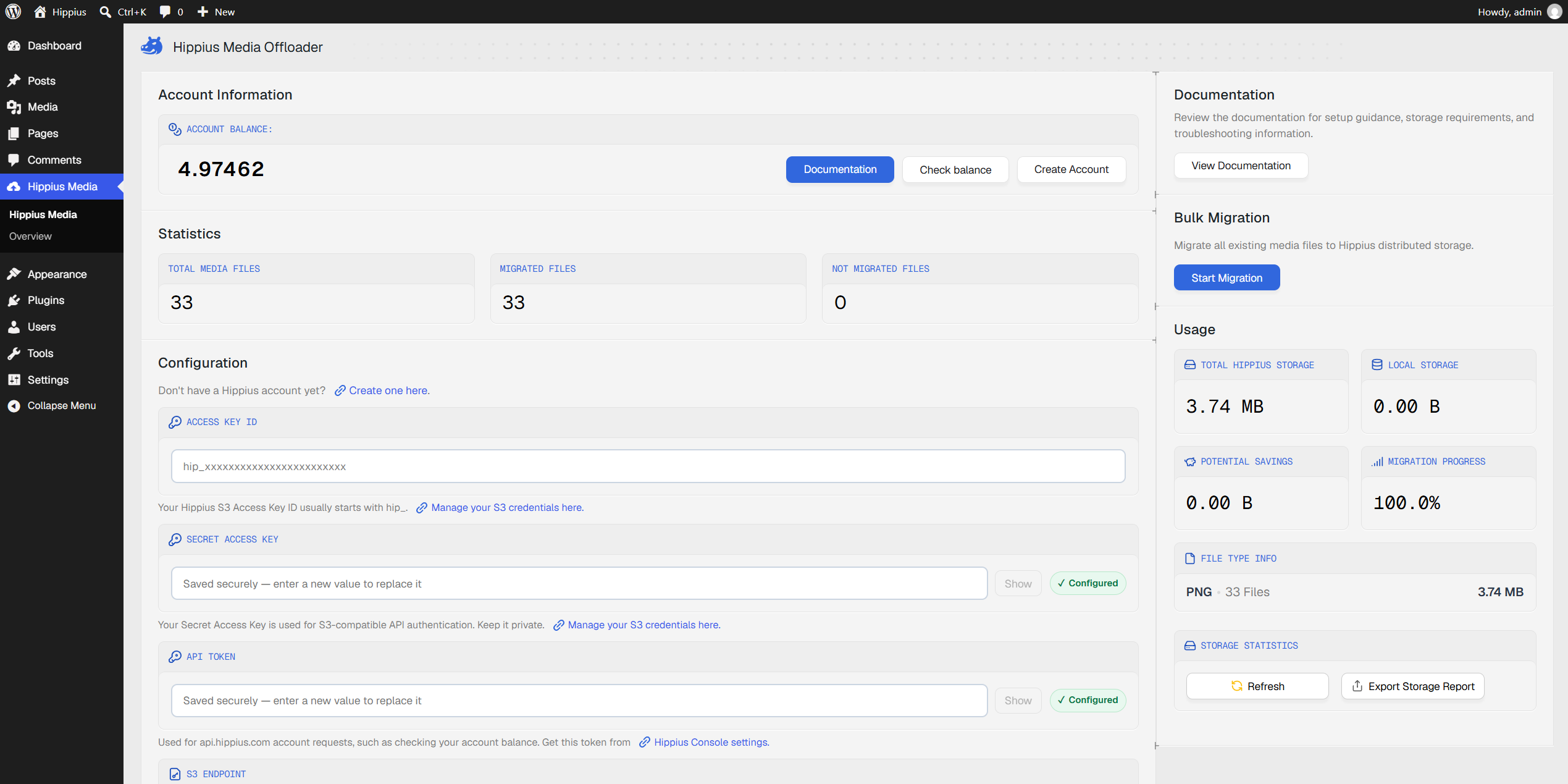
Each file is split and stored with redundancy across the network, so losing a portion of nodes along the way doesn't mean losing the file. The plugin also updates every media URL in your posts and pages automatically, so the switch is transparent to visitors. Full technical detail, including the erasure coding scheme, endpoint regions, and how Arion handles storage under the hood, is in the Hippius docs.
One thing worth being precise about: this plugin encrypts your files at rest using server-side envelope encryption once they reach Hippius. It doesn't encrypt files client-side before they leave your WordPress server. If you want files encrypted on-device before upload, that's what the Hippius Desktop App is for; the two aren't the same product or the same use case.
Common Questions About the Hippius Media Offloader
Will offloading media slow down my site?
No, in most cases it helps. Your origin server no longer has to store or serve every media file itself, which frees up bandwidth and reduces load. For a global audience, you can also pair it with Hippius CDN for additional caching.
Can I revert to local storage later?
If you kept local copies during migration, deactivating the plugin restores WordPress's default behavior of serving files from wp-content/uploads. There's no automatic reverse-migration that pulls files back down from Hippius, which is exactly why keeping local copies during your first migration is worth doing.
Final Thoughts
For WordPress sites carrying a growing media library, moving that weight onto s3 compatible storage is one of the more straightforward performance wins available. Hippius Media Offloader makes the migration a WordPress-admin task rather than a server one. Bulk migrate what's already there, turn on auto-migration for what's next, and the plugin handles the rest through a standard S3-compatible connection.
If you're ready to try it, create a free Hippius account, install Hippius Media Offloader from the WordPress plugin directory, and run your first migration today.
About Hippius
Hippius is a distributed cloud platform built to give users a verifiable alternative to providers like AWS and Google Cloud. Files are encrypted and distributed across an independent network rather than held in a single provider's data center. Every storage claim, payment, and miner action is recorded on Hippius's own blockchain, so instead of asking users to trust the platform, Hippius lets them check it for themselves. On top of that foundation sits a full product suite: personal cloud storage, S3-compatible object storage with no egress fees, confidential computing on secure hardware, and a container and model registry for AI. Hippius runs as Subnet 75 on Bittensor and was built by The Nerve Lab.
Website | Discord | Twitter | Docs | Blog | Medium | Forum | Github