Hippius Confidential Compute is now live. Every virtual machine you launch on Hippius now runs inside a hardware trusted execution environment. Its memory is encrypted by the processor, its disk stays locked until the hardware confirms what it's running, and the person who owns the server can't read what's inside. That applies to VMs, managed PostgreSQL, managed Kubernetes, and GitHub Actions runners, and it's open to every Hippius account today.
Your files on Hippius are already encrypted when they're stored and when they move across the network. Confidential Compute covers the third state, the one most cloud platforms leave exposed: your data while it's actually being used. Below, we cover what's launching, how a confidential VM keeps your data private, where it fits, and how to launch your first one.\

What's launching today
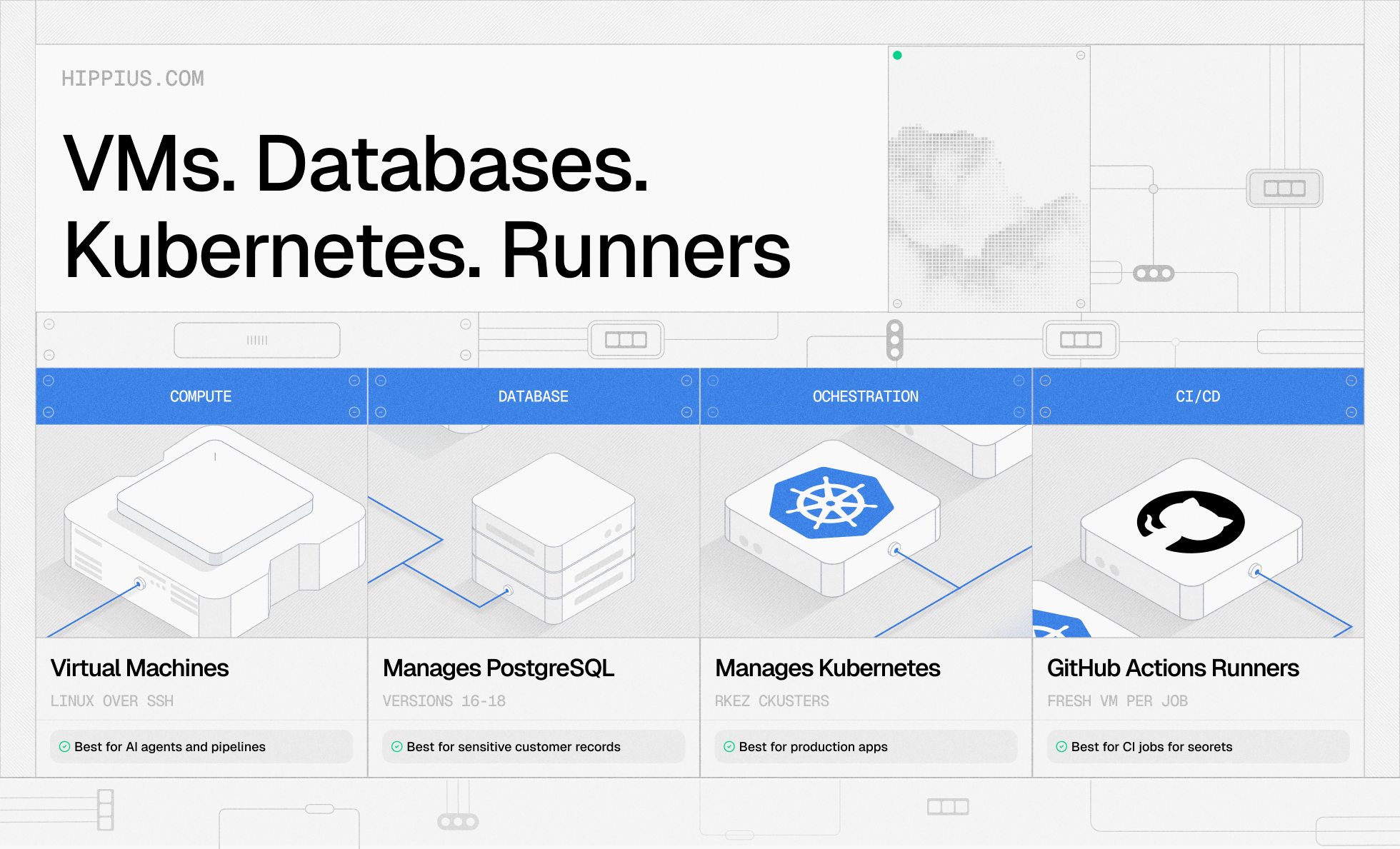
You'll find everything under Confidential Compute in the sidebar of the Hippius console. Four products launch together, and each one runs as a confidential VM:
- Virtual machines. Linux VMs you reach over SSH, with Ubuntu, Debian, Fedora, Rocky Linux, AlmaLinux, Arch and more available, plus ready-made applications such as WordPress that configure themselves on first boot.
- Managed PostgreSQL. Versions 16, 17 and 18, as a single instance or a three-instance setup, with no shell access to manage.
- Managed Kubernetes. RKE2 clusters with three confidential control-plane nodes, and a kubeconfig sealed to a cluster key that's generated in your browser.
- GitHub Actions runners. Every job gets a fresh confidential VM, and that VM is destroyed when the job finishes.
You can let Hippius place a VM anywhere on the network, or pin it to a specific country. The create form only offers countries where a verified server has room right now. Billing works like the rest of Hippius: no monthly plan, just a dollar balance you top up, metered per second with a one-minute minimum. Each form shows the hourly and monthly cost before you launch, and the full price list is in the compute docs.
Why does data need protecting while it runs?
Data security in cloud computing has mostly focused on two states. Data at rest is encrypted on disk. Data in transit is encrypted as it moves over the network. Both are now standard.
The gap is the moment your workload actually runs. To do anything useful, a program has to load its data into memory, and on an ordinary server that memory is readable by whoever controls the machine: the host operating system, the hypervisor, and anyone with administrative access. Your database records, your API keys and your customer data all sit there in plain text while the job runs.
On a distributed network that question matters even more. Hippius workloads run on servers operated by independent miners rather than one company's data center, so "trust whoever runs the hardware" isn't a good enough answer. Confidential compute exists to close that gap. The Confidential Computing Consortium, the Linux Foundation project that sets common terms for the field, defines the approach as protecting data in use by performing computation in a hardware-based, attested environment. That's the model Hippius now applies to every compute workload.
How does a Hippius confidential VM keep your data private?
Every Hippius VM runs on processors with AMD SEV-SNP, a hardware feature that gives each VM its own secure enclave. The processor encrypts the VM's memory with a key the server never sees, so even the person who owns the machine only sees scrambled data.
Your VM's disk is encrypted too, and it stays locked until the hardware confirms the VM is running exactly the software it should be. Only then is the key released. You can see this for yourself in the console, where each VM shows its attestation status as it boots.
When you delete a VM, its disk is permanently erased. If you want the full technical walkthrough, the Confidential Compute docs cover every step.
Where confidential compute fits
The short answer is any workload where the data matters more than the server it runs on.
Databases holding sensitive records. Cloud database security usually means encrypting the disk and locking down network access, while the database itself runs in readable memory. Managed PostgreSQL on Hippius runs on confidential instances, so customer tables, session data and anything else your app stores stay encrypted in memory on hardware run by someone else.
CI pipelines that handle secrets. Build jobs routinely touch deploy keys, signing keys and API tokens. A Hippius runner gives every GitHub Actions job its own confidential VM and throws it away afterwards, so those secrets don't sit on a shared machine once the job ends.
AI agents and data pipelines. Confidential AI is mostly about keeping prompts, user data and credentials private while they're processed. An agent that reads a user's documents, or a pipeline that cleans sensitive data before it reaches a model, can run inside a confidential VM rather than in plain memory on a shared host.
Production apps on distributed hardware. Kubernetes clusters on Hippius run their control plane on confidential nodes, which makes it practical to run real services on a distributed network without handing their contents to whoever runs each machine.
If you already store data on Hippius, this is the missing piece. Drive encrypts files on your device before upload, as covered in our post on why Drive asks for a password, while S3 storage is encrypted at rest. Confidential Compute extends protection to the point where that data is actually being used.
Common questions about trusted execution environments
What is a trusted execution environment?
A trusted execution environment (TEE) is an isolated area of a processor where code and data are protected from the rest of the system, including the operating system and hypervisor. On Hippius, each VM runs as a TEE using AMD SEV-SNP, so its memory is encrypted by the processor and its disk is unlocked only after the hardware confirms what software it's running.
Is a secure enclave the same as a TEE?
They're closely related. "Secure enclave" usually refers to a specific isolated region protected by hardware, while "trusted execution environment" is the broader term for any hardware-isolated environment that keeps code and data private while they're in use. A Hippius confidential VM is a TEE that covers the whole virtual machine, not just a small piece of an application.
Can the cloud provider see my data in a confidential VM?
The owner of the physical server can't read a confidential VM's memory or disk. On Hippius, that's the miner running the hardware. Hippius itself can't read a running VM directly, but it currently manages the release of disk keys, so for now you are trusting Hippius to run that process. Customer-held keys aren't available yet.
Launch your first confidential VM
Hippius Confidential Compute is live for every account. Your VMs, PostgreSQL databases, Kubernetes clusters and GitHub Actions runners now run in a trusted execution environment, with memory encrypted by the processor, disks unlocked only after a signed hardware check, and attestation status you can see for yourself. To try it, open the Hippius console, go to Confidential Compute, and click + New VM. Pick an image and a size, add your SSH key, and watch the Boot Phase move to "Disk unsealed." The virtual machine guide walks through each step if you'd like a hand.
About Hippius
Hippius is a distributed cloud platform built to give users a verifiable alternative to providers like AWS and Google Cloud. Files are encrypted and distributed across an independent network rather than held in a single provider's data center. Every storage claim, payment, and miner action is recorded on Hippius's own blockchain, so instead of asking users to trust the platform, Hippius lets them check it for themselves. On top of that foundation sits a full product suite: personal cloud storage, S3-compatible object storage with no egress fees, confidential compute on secure hardware, and a container and model registry for AI. Hippius runs as Subnet 75 on Bittensor and was built by The Nerve Lab.
Website | Discord | Twitter | LinkedIn | Docs | Blog | Medium | Forum | Github
\