Hippius Shared Accounts give your team proper cloud access management without anyone sharing a password. You invite people into your Hippius account, each person signs in with their own login, and you decide what they can touch across S3, Confidential Compute and CDN, one product at a time. Everything they build stays in your account and runs on your balance.
That matters because a lot of small teams still share cloud infrastructure the risky way: one login, passed around in a chat thread, with full control over everything.
What is a Hippius Shared Account?
A Shared Account lets other people work inside your Hippius account while keeping their own identity. Each member has a separate login and keeps their own personal Hippius account too, switching between the two from the profile menu in the Hippius console.
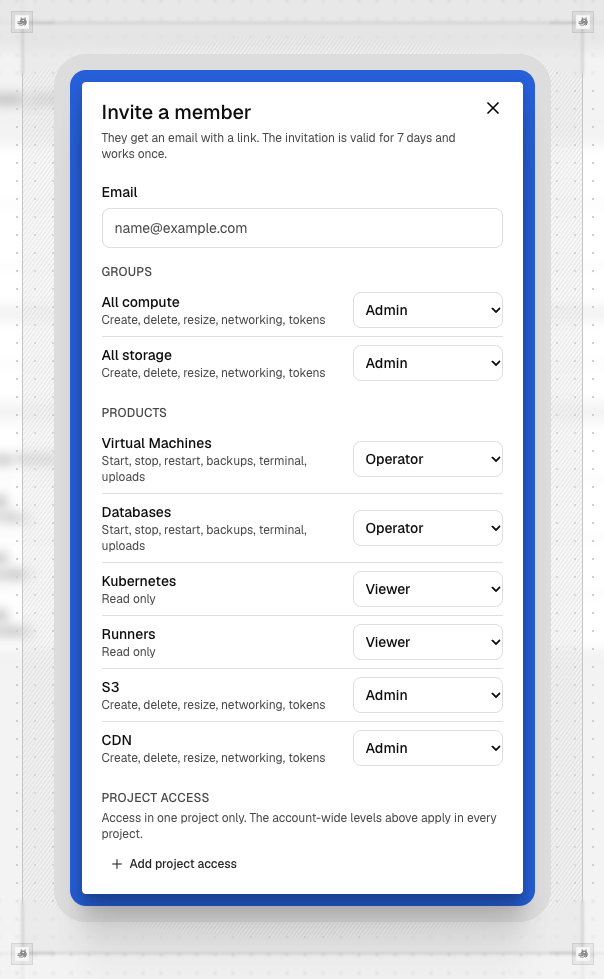
You choose access separately for virtual machines, databases, Kubernetes, GitHub Actions runners, S3 and CDN. A member only sees the products you've granted, and CDN always needs its own grant, which is a sensible default for something that controls what the public sees and how much you spend on delivery.
Why one shared login doesn't scale
Sharing one set of credentials feels quick on day one. By month three, nobody can say who deleted that bucket, who resized that VM, or who still has the password after leaving the project. Changing the password locks everyone out at once, and every person who has it has the same power as the owner.
The large cloud providers warn against this pattern directly. AWS, for example, recommends not sharing root user credentials and using a separate administrative user for everyday tasks. The reasoning applies to any cloud account: the login that can add funds and delete everything should not be the one a contractor uses to restart a database.
Good cloud user management comes down to three things. Each person has their own identity. Each person has only the access their work needs. And there's a record of who changed what. Shared Accounts are built around all three, including an audit trail of every change to the team and every change members make.
How do per-product roles support least privilege access?
Least privilege is the security principle that people should get only the access their job requires. On Hippius, you put it into practice by setting a level for each product instead of handing out one blanket permission:
- Viewer can see resources and settings but can't change anything.
- Operator can work with what already exists, like restarting a VM or uploading files to S3.
- Admin can create, delete and configure resources (Kubernetes clusters must be created by the owner).
Because the level is set per product, the combinations follow how teams actually work. A frontend developer might be an Admin on CDN and a Viewer on everything else. A backend engineer could be an Operator on VMs and databases with no S3 access at all. Two extra permissions let you hand off team management and billing visibility without giving away anything else.
This also covers the everyday side of S3 access control. On most object storage platforms, deciding who can upload files and who can delete buckets means writing policies in JSON. With Shared Accounts, it's a choice between three levels. To be clear about the scope, this is role-based team access, not a full identity and access management system, so plan separately if you need fine-grained rules per bucket or per key.
The Shared Accounts guide in the Hippius docs lists exactly what each level allows for every product.
Who owns and pays for what your team builds?
You do. Anything a member launches, from a VM on Confidential Compute to a zone on Hippius CDN, belongs to your account and is paid from your balance. If someone leaves or is removed, everything they built stays where it is.
A few actions stay with the owner whatever roles you hand out, including adding funds and changing plans, and nobody can remove the owner or change the owner's access. That keeps the account, and the bill, firmly in one person's hands.
Shared Accounts or Shared Drives?
Hippius has two ways to work as a team, and they solve different problems. Shared Accounts give people access to the infrastructure you run: servers, databases, S3 buckets and CDN zones. Shared Drives give people a shared space for files in Hippius Drive: documents, designs, contracts and anything else your team opens and edits.
The way access works is different too. A Shared Account brings someone into your whole Hippius account, with a role set for each product. A Shared Drive is narrower: you invite people to one drive (or a folder in the drive) with one of the below access levels:
- A Viewer who can open and download
- An Editor who can also upload and change files or
- A Manager who can also invite and remove members
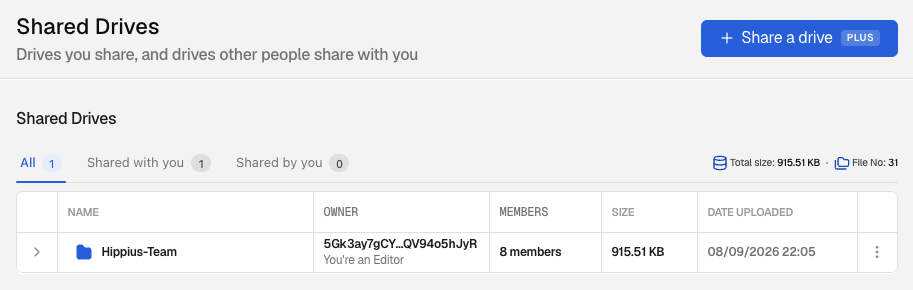
Privacy works differently as well. Files in a Shared Drive are encrypted on the device that uploads them, the same as the rest of Drive, and Hippius never holds the key. That's also why Drive stays out of Shared Accounts completely: it's hidden when a member switches into your account, so your personal files never mix with the infrastructure your team manages.
| Shared Accounts | Shared Drives | |
|---|---|---|
| Best for | Running infrastructure together | Working on files together |
| Covers | VMs, databases, Kubernetes, runners, S3, CDN | One folder in Hippius Drive |
| Roles | Viewer, Operator, Admin (per product) | Viewer, Editor, Manager |
| Who pays | The account owner | The drive owner |
| Joining | Invite by email | Invite by link or email. Free to join on any plan; the owner needs Plus, Max or Scale plan to share. |
Many teams will use both: a Shared Account for the developers running the product, and a Shared Drive for everyone who needs the files around it.
Common questions about cloud access management
What is least privilege access control?
Least privilege access control means each user gets the minimum access needed to do their job, and nothing more. It limits the damage a mistake or a compromised login can cause. On Hippius, that means giving each team member the lowest level that covers their work on each product.
How do you manage user access as cloud use expands?
Give every person their own login, assign access by role instead of sharing credentials, and review who has access as projects change. A clear record of team changes helps you spot access that's no longer needed. On Hippius, members, roles and the audit trail all live on the Team page in the console.
What happens when someone leaves the team?
You can remove a member from the Team page at any time, which takes away all of their access in one step. Members can also leave on their own. Everything they created stays in your account, and they can only come back with a new invitation.
Invite your first team member
In the Hippius console, go to Team, then Members, and click Invite member. Enter their email, choose a level for each product, and send. Start each person on the lowest level that covers their work and raise it when they need more. The Shared Accounts docs cover invites, limits and every permission in detail. Open the console and send your first invite today.
About Hippius
Hippius is a distributed cloud platform built to give users a verifiable alternative to providers like AWS and Google Cloud. Files are encrypted and distributed across an independent network rather than held in a single provider's data center. Every storage claim, payment, and miner action is recorded on Hippius's own blockchain, so instead of asking users to trust the platform, Hippius lets them check it for themselves. On top of that foundation sits a full product suite: personal cloud storage, S3-compatible object storage with no egress fees, confidential compute on secure hardware, and a container and model registry for AI. Hippius runs as Subnet 75 on Bittensor and was built by The Nerve Lab.
Website | Discord | Twitter | LinkedIn | Docs | Blog | Medium | Forum | Github