Hippius Shared Drives are live. Any folder in your Drive can now become a shared space where a team, a family or a group of clients works from the same files. It's encrypted file sharing built for ongoing work rather than one-off sends, with the same end-to-end encryption that protects everything else you keep in Drive.
Until now, sharing in Drive meant sending a link to a file or folder that ultimately expires. That's still the right tool for handing someone a finished file. Shared drives cover the other half of secure collaboration: the folders several people need to open, add to and tidy up. Below, we cover how invites keep your keys private, what each role can do, who pays for what, and what's arriving with this release.
What is a shared drive in Hippius Drive?
A shared drive is a folder you share with other members. You pick a folder you already have, turn it into a shared drive, and invite the people who should be in it. From then on, everyone in the drive sees the same files, and each person's role decides whether they can only open things or also add, rename and remove them.
The person who creates the drive is its owner. Every file shows who added it, so a busy folder never turns into a pile of documents nobody remembers uploading. Anyone can also leave a drive whenever they like.
This is different from a share link where you hand someone a file, they preview or download it, and the link expires. A shared drive is a workspace: people join it, stay in it, and contribute to it for as long as the work runs.

How do invites keep your files private?
Drive encrypts every file on your device before it leaves, and your key is protected by your unlock password. Hippius never has a copy of that key, which is why we can't read your files. We covered how that works in our guide to why Drive asks for a password.
Shared drives had to keep that promise while letting other people in. An invite link carries the key to the drive itself, so the key travels from you to the person you invite. An email invite carries no key at all: the key reaches the new member sealed to a key only they hold, once a Manager confirms them, so a forwarded email can't be used by anyone else. Either way, the key never passes to Hippius, and we never hold it.
This is the core idea behind end-to-end encryption: information is locked by the sender and unlocked only by the intended recipient, so the service in the middle can't read it. With shared drives, the "recipient" is every member you let in, and the service in the middle is us.
One practical consequence is worth mentioning. Because the invite link holds the key, treat it the way you'd treat a house key. Send it through a channel you trust, and revoke any invite link you no longer need from the access panel.
Shared drive permissions: Viewer, Editor and Manager
People join as a Viewer or an Editor, depending on the invite, and can be made a Manager from the access panel once they're in. The owner sits above all three roles:
- Viewer can open and download files. Good for anyone who needs to see the work but shouldn't change it.
- Editor can do everything a Viewer can, plus upload, rename and delete files. This is the day-to-day role for people doing the work.
- Manager can do everything an Editor can, plus invite people, remove them and change their roles.
- Owner is the only person who can delete the drive itself.
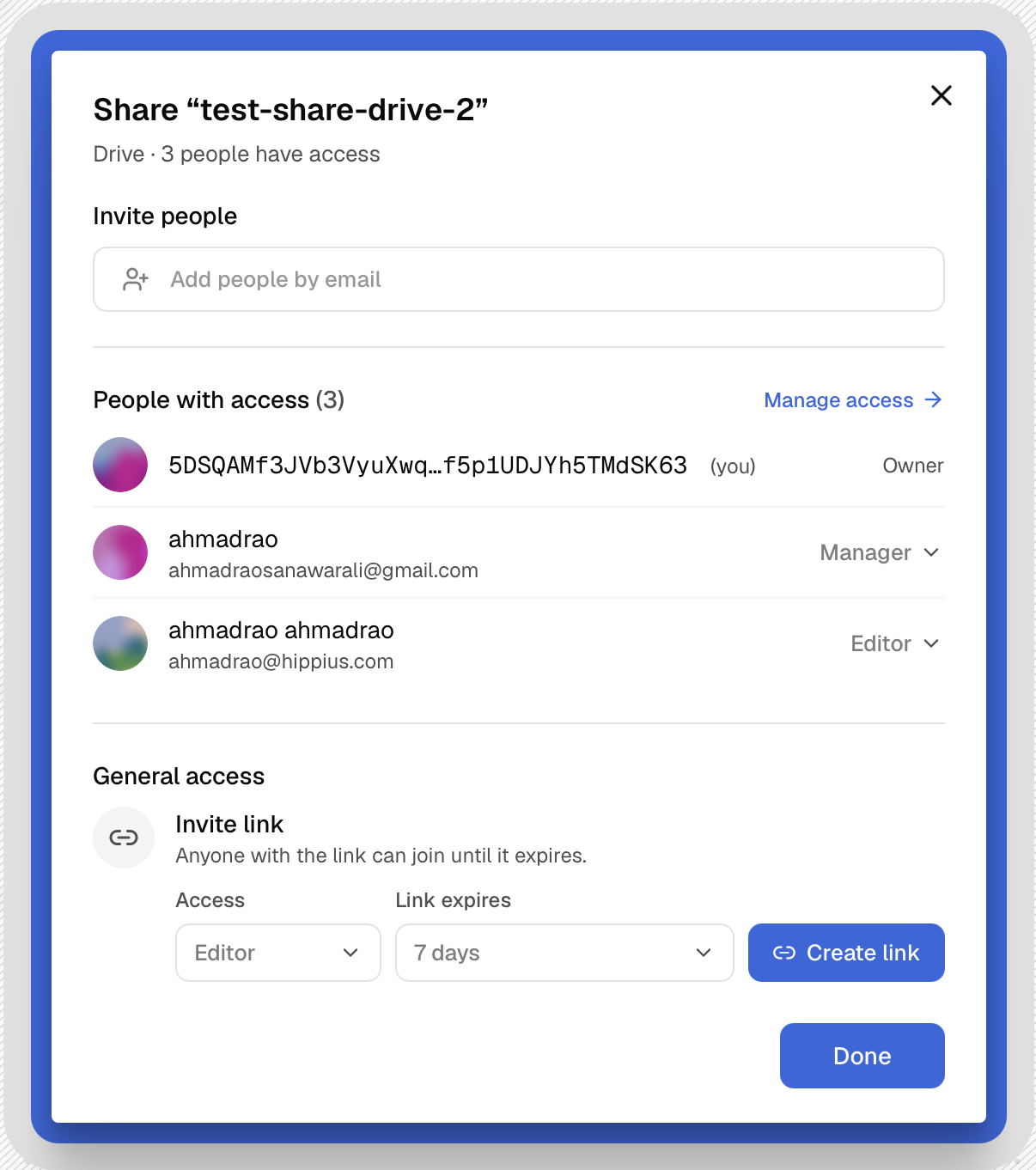
A good habit is to start people at the lowest role that gets their job done and raise it when they need more. Security teams call this the principle of least privilege, and it's as useful for a family photo archive as it is for a company. Relatives who just want to browse the holiday pictures can be Viewers. The two people sorting and captioning them can be Editors. And if you'd rather not be the one handling every "can you add my partner?" request, make someone a Manager.
Who pays for a shared drive?
The owner does, and only the owner. To create a shared drive you need a Plus, Max or Scale plan, and the storage the drive uses is paid for by the owner.
- Plus is $7 a month for 2 TB
- Max is $22 a month for 10 TB
- Scale is $50 a month for 25 TB
Members pay nothing to join, and they can be on any plan, including Free. The people you work with shouldn't need to upgrade just to see a folder you've invited them into, and a family shouldn't need five subscriptions to share one set of photos. You can compare what each plan includes on the pricing page.
Running a shared drive day to day
Access lives in a side panel next to the drive. It shows everyone who's a member, the role each person holds, and your invite links. Change a role or remove someone there and it applies straight away, with no waiting for a sync and nothing extra to confirm.
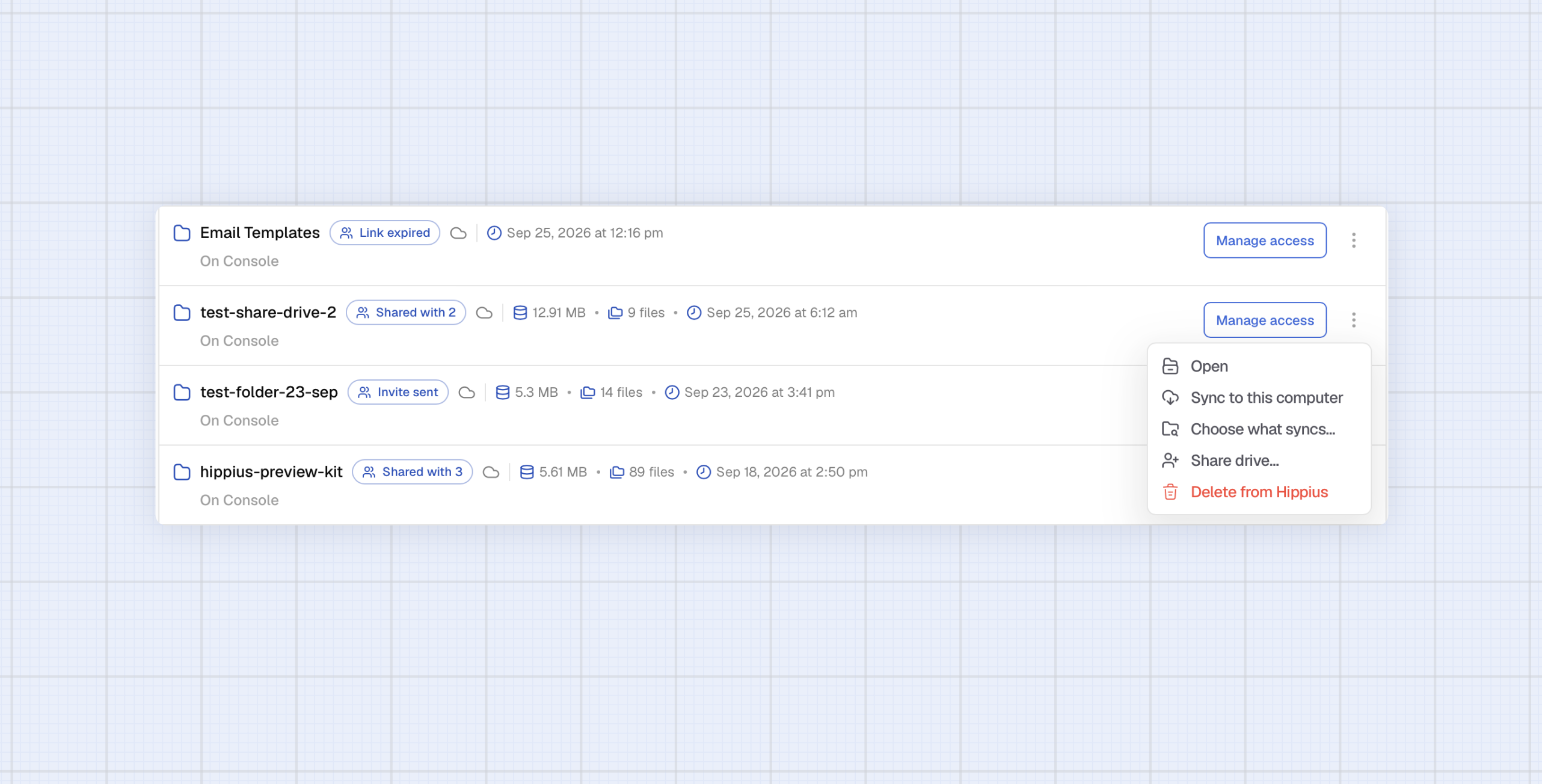
Three additions land with this release:
- You can now invite people by email as well as by link.
- The member list shows people's names rather than account addresses, so you can tell at a glance who's who.
- You can share a single folder from inside a shared drive, with its own roles, without handing over the whole drive.
That last one is especially handy for small firms. An accounting practice, for example, can keep one shared drive for all its client work and share each client's folder with just that client. That's secure file sharing for accountants without a new link every tax season: the client sees their own folder and nothing else, and the practice keeps everything organised in one place.
Common questions about shared drives
Can someone on the Free plan join a shared drive?
Yes. Anyone can join a shared drive on any plan, including Free. Only the owner needs a Plus, Max or Scale plan, because the owner pays for the drive's storage.
Can Hippius see the files in a shared drive?
No. Files in a shared drive are encrypted on the device that uploads them, the same as the rest of Drive. Whether you invite someone by link or by email, Hippius never holds the key.
How do you create a shared drive?
To create a shared drive in Hippius Drive, you need a Plus, Max or Scale plan. In the Hippius console or desktop app, pick any folder you already have and turn it into a shared drive. Then invite people by link or by email as a Viewer or an Editor, and make anyone who'll help run the drive a Manager once they've joined.
Is Hippius Drive an encrypted Dropbox alternative for teams?
If you're looking for an encrypted Dropbox alternative for your team to collaborate on, Hippius Drive is the perfect fit. The everyday parts work the way you'd expect: sync across devices, previews, search and sharing. What's different is that files are encrypted before they leave your device, and the keys stay with you and the people you invite.
Create your first shared drive
Shared drives take Hippius Drive from a place you keep your own files to a place you work on them with other people, and the encrypted file sharing underneath stays as private as the rest of Drive. Owners on Plus, Max or Scale can start today.
Open Drive in the Hippius console or download the desktop app, pick a folder, turn it into a shared drive and send your first invite.
For more info visit the Shared Drives docs for Console or Desktop app.
About Hippius
Hippius is a distributed cloud platform built to give users a verifiable alternative to providers like AWS and Google Cloud. Files are encrypted and distributed across an independent network rather than held in a single provider's data center. Every storage claim, payment, and miner action is recorded on Hippius's own blockchain, so instead of asking users to trust the platform, Hippius lets them check it for themselves. On top of that foundation sits a full product suite: personal cloud storage, S3-compatible object storage with no egress fees, confidential computing on secure hardware, and a container and model registry for AI. Hippius runs as Subnet 75 on Bittensor and was built by The Nerve Lab.
Website | Discord | Twitter | Docs | Blog | Medium | Forum | Github | LinkedIn
\