An S3 bucket is a container that holds files, called objects, in S3 object storage; each object sits in the bucket under a unique name, called its key. Buckets began with Amazon S3, but every S3-compatible service uses them the same way, with the same tools.
On Hippius you can create a bucket in the console, point the AWS CLI, Boto3 or rclone at it, and pay $6 per TB a month with no egress fees, as of 26 November 2026.
Contents
- How S3 buckets, objects and keys work
- S3 bucket naming rules
- Regions and bucket URLs
- Who can access an S3 bucket?
- How much can an S3 bucket hold?
- What does an S3 bucket cost?
- How to create an S3 bucket
- What are S3 buckets used for?
- S3 buckets outside AWS
- Common questions about S3 buckets
How S3 buckets, objects and keys work
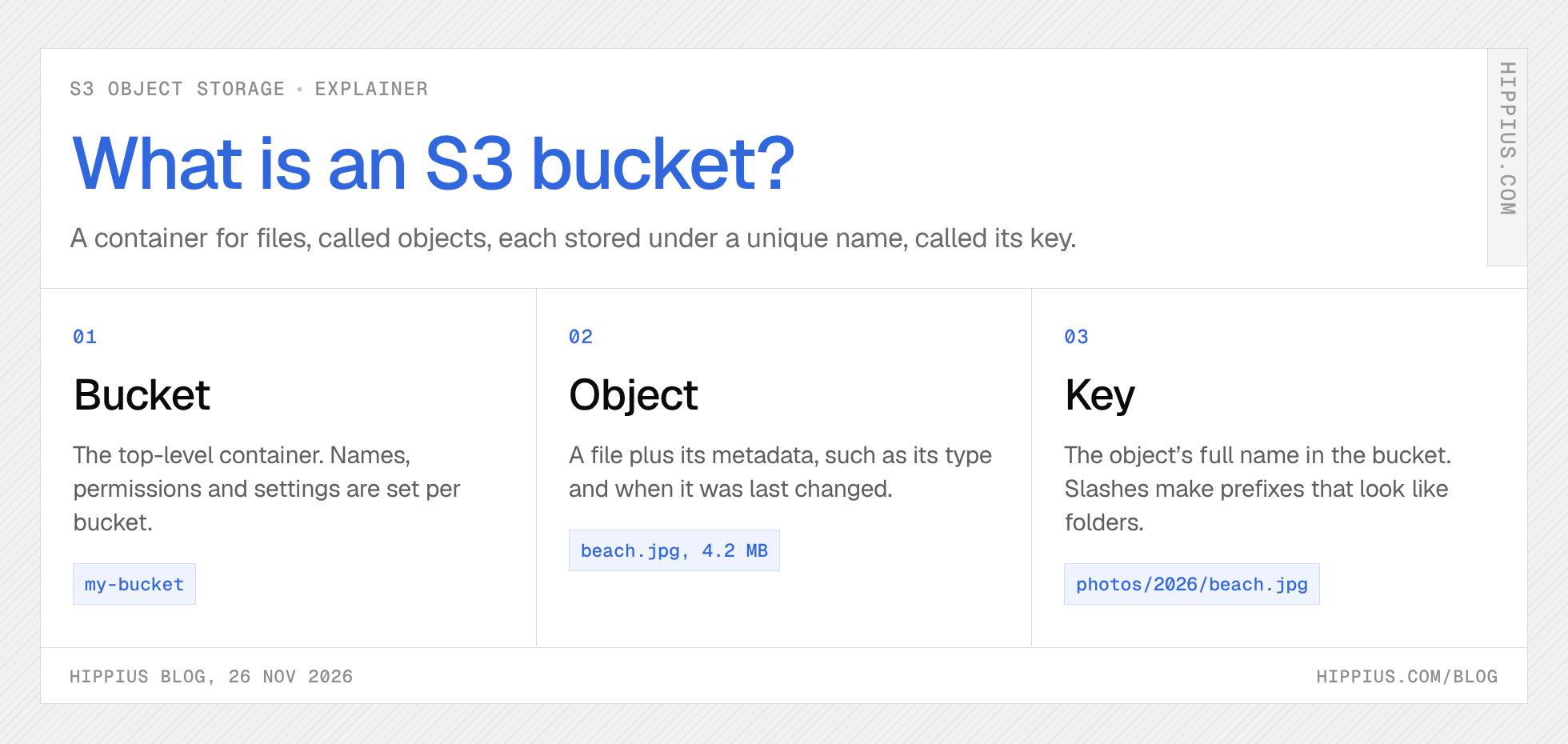
S3 storage has three parts: the bucket, the objects inside it, and the key that names each object.
- Bucket: the top-level container. You create it once, give it a name, and every object you store lives inside a bucket. Permissions, versioning and other settings are set per bucket.
- Object: a file plus its metadata, such as the content type and the date it was last changed. An object can be a photo, a backup archive, a video or a dataset shard.
- Key: the object's full name within the bucket. A bucket name and a key together point to exactly one object.
Inside a bucket the layout is flat: there are no real folders. Take the key photos/2026/beach.jpg. S3 stores that as one object whose name happens to contain slashes. The part before the last slash, photos/2026/, is called a prefix, and consoles and tools show prefixes as folders so a bucket is easier to browse. Hippius's console docs describe it the same way: buckets are flat, and keys containing slashes are shown as folders.
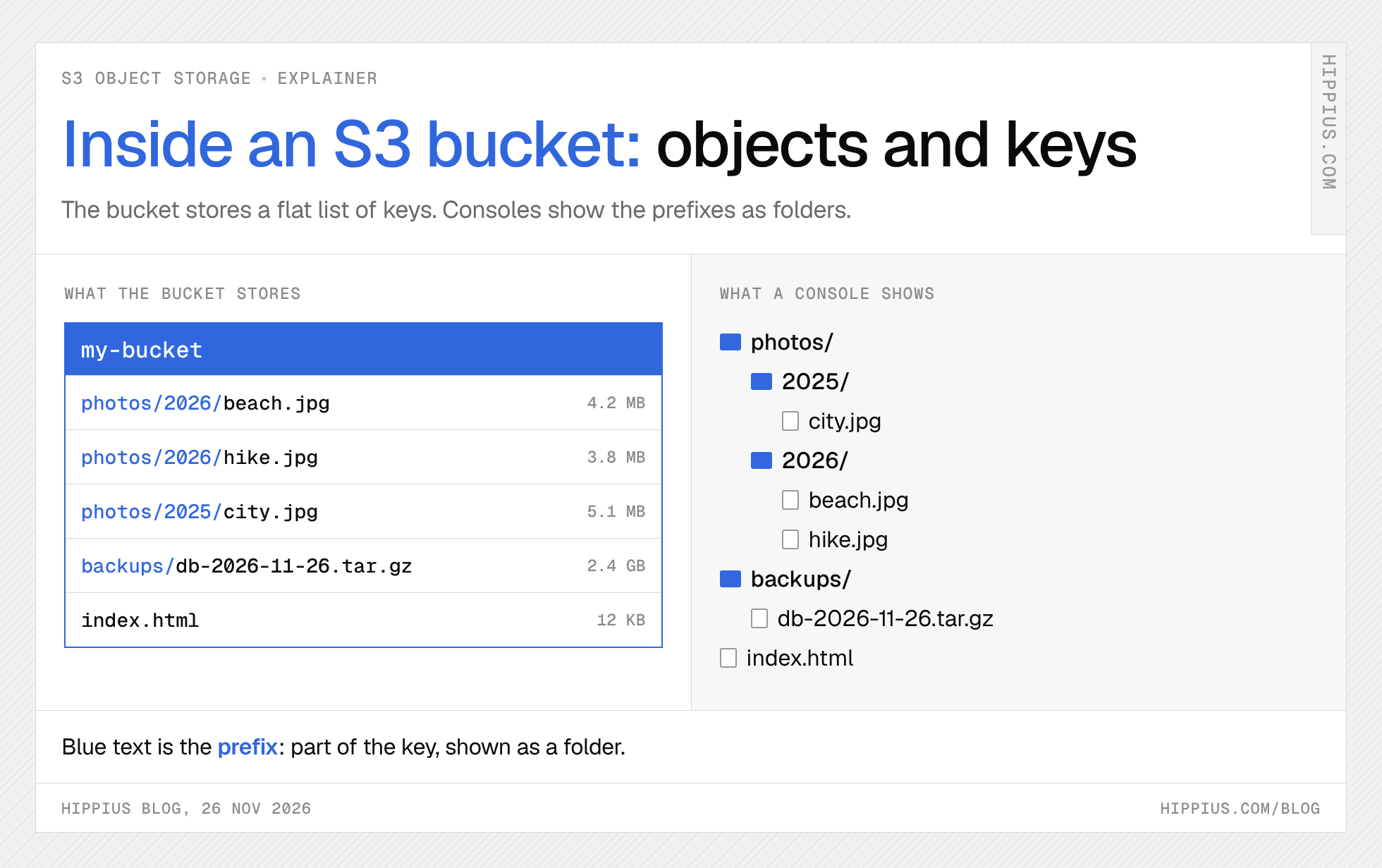
Because folders are only prefixes, renaming a "folder" means copying every object under it to a new key and deleting the old ones. Listing a prefix, such as every object starting with photos/2026/, is fast, so it pays to organise keys by date, user or project.
S3 bucket naming rules
On Amazon S3, bucket names must be unique across all AWS accounts in all Regions within a partition, so if someone else already owns my-photos, you can't create it, unless you use the optional account regional namespace AWS now offers. AWS also says you can't rename a bucket or move it to another Region after you create it, so pick the name with care.
| Rule | Amazon S3 | Hippius |
|---|---|---|
| Length | 3 to 63 characters | 3 to 63 characters |
| Characters | Lowercase letters, numbers, dots and hyphens | Lowercase letters, numbers, dashes and dots |
| First and last character | A letter or number | A letter or number |
| Dots | No two in a row | No two in a row, and no dot next to a dash |
| Other limits | Not formatted as an IP address; reserved prefixes and suffixes such as xn-- and -s3alias | None listed |
AWS recommends against dots in bucket names except for static website hosting, because buckets with dots can't use virtual-hosted-style addresses over HTTPS without extra certificate checks. Names also appear in object URLs, so keep private details out of them.
Regions and bucket URLs
On AWS, you choose a Region when you create a bucket, and the data stays in that Region unless you copy it elsewhere. A bucket's objects can then be reached with two styles of URL, both described in AWS's guide to bucket addressing:
- Virtual-hosted style puts the bucket name in the domain:
https://my-bucket.s3.us-west-2.amazonaws.com/photos/2026/beach.jpg - Path style puts the bucket name in the path:
https://s3.us-west-2.amazonaws.com/my-bucket/photos/2026/beach.jpg
Amazon S3 supports both styles in all Regions. AWS planned to deprecate path-style URLs, then delayed that in September 2020 to give customers time to move to virtual-hosted style.
Hippius uses path style only. Every bucket is reached at https://s3.hippius.com/my-bucket/..., and there is no Region to choose: Hippius spreads each file across its storage network, and you enter one fixed region value in your S3 client settings, shown in the code example below.
Who can access an S3 bucket?
S3 buckets are private by default, on Amazon S3 and on Hippius. Only the account that owns a bucket, and the keys it creates, can read or write its objects until you open access up.
There are four common ways to share what's in a bucket:
- Access keys for people and apps you trust. On Hippius, sub-tokens can be limited to read-only or read-and-write, to all buckets or chosen ones, and to a set lifespan.
- Presigned URLs give anyone a link to one object for a limited time, with no account. Hippius links last up to 7 days.
- Bucket policies set rules for a whole bucket or a prefix, such as letting the public read objects under
public/. - ACLs, the older per-bucket and per-object permissions, such as
public-read.
On Amazon S3, new buckets have all four Block Public Access settings switched on and ACLs switched off, so making data public takes a deliberate change. On Hippius, a bucket or a single object can be made public with the public-read ACL (on a bucket this also makes its listing public), and public objects are served at https://s3.hippius.com/bucket/key, as described in the advanced usage docs.
How much can an S3 bucket hold?
There's no limit on how much one bucket can hold. AWS's bucket quotas page says there is no maximum bucket size and no limit on the number of objects, and each account can create up to 10,000 general purpose buckets by default.
The limits apply to single objects:
- Amazon S3: one upload request takes up to 5 GB, and a multipart upload takes an object up to 50 TB, split into parts sent in parallel. The S3 console uploads files up to 160 GB.
- Hippius: multipart uploads take an object up to about 5 TiB, in parts of up to 512 MiB, according to its S3 compatibility page. The web console uploads files under 100 MB each; for larger files, use an S3 client such as the AWS CLI or rclone, which switch to multipart automatically.
What does an S3 bucket cost?
The bucket itself is free; you pay for what goes in and out of it. On Amazon S3 the main charges are storage, priced by size, time stored and storage class, requests such as uploads and listings, and data transferred out to the internet, all listed on AWS's S3 pricing page, while uploading data from the internet is free. For worked monthly costs, see our guide to S3 pricing.
On Hippius, storage is $6 per TB a month, billed hourly for what you store, with no egress fees, and its plans include unlimited requests, according to its pricing page on 26 November 2026. Plans start at $53 a month for 10 TB, with Business at $245 for 50 TB and Enterprise at $465 for 100 TB.
How to create an S3 bucket
On Amazon S3, in the console:
- Open the S3 console and choose the Region for the bucket from the navigation bar.
- Choose General purpose buckets, then Create bucket.
- Enter a bucket name that follows the rules above.
- Keep the default Block Public Access and ownership settings unless you need public access, then choose Create bucket.
On Hippius, in the console:
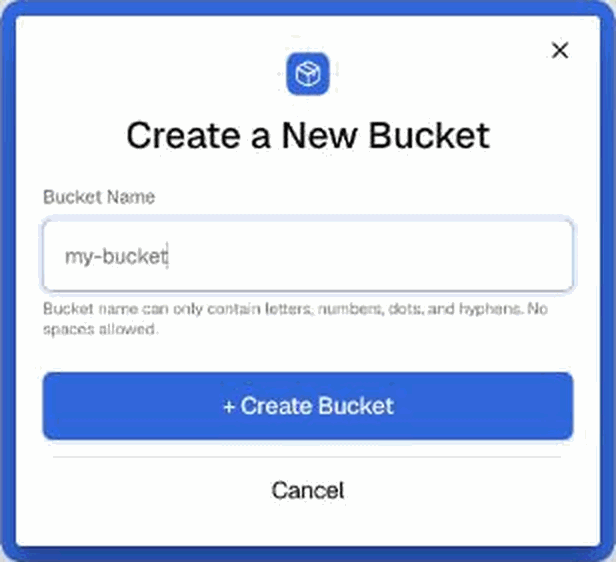
- In the Hippius console, make sure you have an active master token, then open Object Storage and Buckets.
- Click + Create Bucket at the top right.
- Enter a name that follows the rules above and click Create Bucket. The new bucket appears at the top of the list. To delete a bucket later, empty it first.
On Hippius, with the AWS CLI. Create a profile with your Hippius access key and secret key, set the region value Hippius asks for, then pass the Hippius endpoint with each command, as in Hippius's AWS CLI guide:
aws configure --profile hippius
# AWS Access Key ID: your Hippius access key
# AWS Secret Access Key: your Hippius secret key
# Default region name: decentralized
# Default output format: json

aws s3 mb s3://my-bucket --profile hippius --endpoint-url https://s3.hippius.com

aws s3 cp ./beach.jpg s3://my-bucket/photos/2026/beach.jpg \
  --profile hippius --endpoint-url https://s3.hippius.com

aws s3 ls s3://my-bucket/photos/2026/ --profile hippius --endpoint-url https://s3.hippius.com
The same settings work in rclone, Boto3 and other S3 tools: the Hippius endpoint, the region value above, path-style addressing and your keys. The Object Storage quickstart walks through a first upload.
What are S3 buckets used for?
- Backups: nightly copies of servers, databases and laptops, sent by tools that already speak S3.
- Static assets and websites: images, scripts and downloads served straight from a public bucket or through a CDN.
- Data lakes: raw logs and event data stored once and queried by analytics tools.
- AI datasets and model weights: large training sets and checkpoints that many machines read at once.
- Backups that can't be changed or deleted: Object Lock keeps a version of an object fixed for a retention period, which helps protect backups from ransomware and mistakes. Amazon S3 supports it, with governance and compliance modes and legal holds.
S3 buckets outside AWS
Many object storage providers support the S3 API, so buckets, objects and keys work the same way on other providers. An S3-compatible storage service accepts the same requests, which means the AWS CLI, the AWS SDKs, Boto3 and rclone keep working once you change the endpoint, the region value and the keys.
What changes between providers is the price and the details: egress fees, storage classes, regions and limits. Hippius has no egress fees, does not offer storage classes, and uses path-style addresses only. If you're weighing providers, our guide to S3 alternatives compares them, and our S3 drop-in replacement post covers what changes in your code. When you're ready, you can move your buckets to Hippius using read-only access to your current provider.
Common questions about S3 buckets
What is an S3 bucket?
An S3 bucket is a container that holds files, called objects, in S3 object storage, and each object is stored under a unique name called its key. Buckets began with Amazon S3, and every S3-compatible service, such as Hippius, uses them the same way.
Is an S3 bucket a folder?
No. An S3 bucket is a flat container, and folders inside it are only shared prefixes in object keys, such as photos/2026/ in photos/2026/beach.jpg. Consoles show those prefixes as folders to make a bucket easier to browse.
Is an S3 bucket a database?
No. An S3 bucket stores whole objects that you read and write by key, with no tables, queries or partial updates. Many apps keep files in a bucket and the records that point to them in a database.
Are S3 buckets public by default?
No. New buckets on Amazon S3 are private, with all four Block Public Access settings on, and buckets on Hippius are private too. You have to change a bucket's settings, add a bucket policy or ACL, or share a presigned URL before anyone else can read its objects.
How many objects can an S3 bucket hold?
There's no limit. AWS says there is no maximum bucket size and no limit on the number of objects in a bucket. The limits are per object: up to 50 TB on Amazon S3 and about 5 TiB on Hippius, using multipart upload.
What is the difference between an S3 bucket and an object?
A bucket is the container, and an object is a file stored inside it with its metadata. You create a bucket once and set its permissions; objects are added, read and deleted by their key.
Can I use S3 buckets without AWS?
Yes. Any S3-compatible service uses the same buckets, keys and tools as Amazon S3. On Hippius you can create a bucket, connect the AWS CLI, Boto3 or rclone by changing the endpoint and keys, and pay $6 per TB a month with no egress fees, as of 26 November 2026.
TL;DR
An S3 bucket is a flat container for objects, and each object is stored under a key; folders are only prefixes in those keys. Buckets are private by default, can hold an unlimited number of objects, and are billed for storage, requests and data transferred out. The same bucket model works on any S3-compatible service. On Hippius S3 you can create a bucket in the console or with the AWS CLI and, as of 26 November 2026, pay $6 per TB a month with no egress fees.
About Hippius
Hippius is a distributed cloud platform built to give users a verifiable alternative to providers like AWS and Google Cloud. Files are encrypted and distributed across an independent network rather than held in a single provider's data center. Every storage claim, payment, and miner action is recorded on Hippius's own blockchain, so instead of asking users to trust the platform, Hippius lets them check it for themselves. On top of that foundation sits a full product suite: personal cloud storage, S3-compatible object storage with no egress fees, a CDN that serves stored files from the edge, confidential computing on secure hardware, and a container and model registry for AI.
Website | Discord | Twitter | Docs | Blog | Medium | Forum | Github | LinkedIn