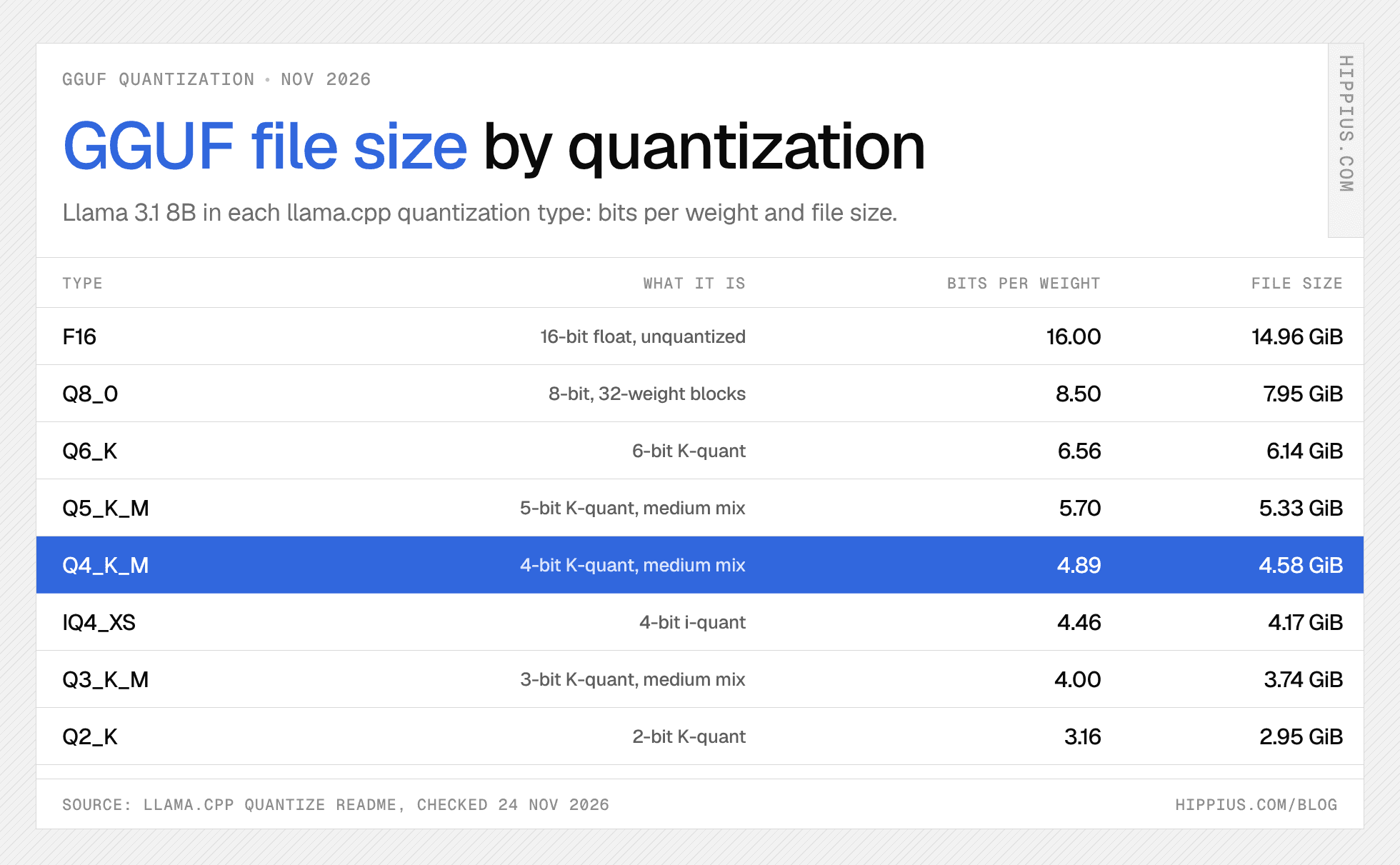
GGUF is a single-file format for running large language models locally, holding the model's weights and the metadata needed to load them, and it's the format llama.cpp, Ollama and LM Studio read. The letters after the model name tell you how the weights were compressed: Q4_K_M means about 4.9 bits per weight using llama.cpp's K-quant method in its medium mix, which shrinks Llama 3.1 8B from 14.96 GiB to 4.58 GiB. Choose safetensors instead when you're training, fine-tuning or serving full-precision weights on GPUs with transformers or vLLM.
On Hippius Hub you can download ready-made Q4_K_M models or store your own GGUF files, public or private, with 125 GB free and the same Python calls you use for Hugging Face.
Contents
- What is a GGUF file?
- What do Q4_K_M, Q5_K_M and Q8_0 mean?
- GGUF quantization types compared
- Which GGUF file should I download?
- GGUF vs safetensors
- Where to download GGUF models
- How to download and run a GGUF file
- Common questions about GGUF
What is a GGUF file?
A GGUF file is one binary file that holds a model's weights plus the metadata a runtime needs to load them: the architecture, context length, tokenizer and quantization type. The GGUF specification in the ggml repository describes it as a file format for storing models for inference with GGML and executors based on GGML.
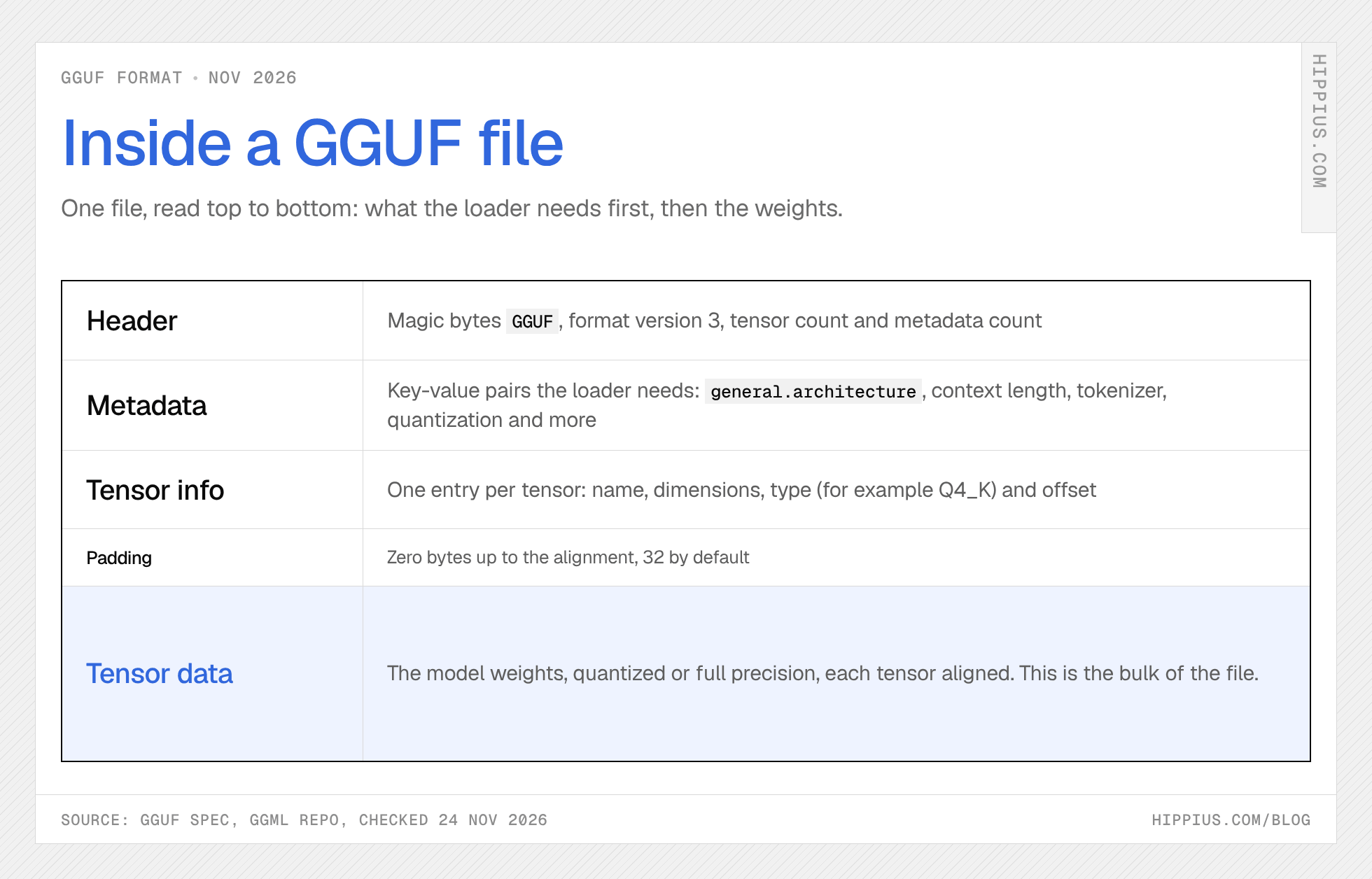
The spec lays the file out in order:
- Header: the magic bytes
GGUF, the format version (version 3 as of November 2026), the number of tensors and the number of metadata entries. - Metadata: typed key-value pairs such as
general.architecture, so the loader knows what kind of model it's reading. - Tensor info: one entry per tensor with its name, dimensions, type and offset in the file.
- Padding: zero bytes up to the alignment, 32 by default.
- Tensor data: the weights themselves.
Why it replaced GGML. GGUF succeeds the older GGML, GGMF and GGJT file formats. Those stored hyperparameters as an untyped list, so adding or removing a value broke compatibility, and they didn't record the model architecture. GGUF's key-value metadata lets new information be added without breaking older files, which is why every current llama.cpp model ships as GGUF. GGML is still the name of the tensor library underneath.
What reads it. llama.cpp, which describes itself as LLM inference in C/C++, is the reference runtime, with Apple Silicon support through Metal and custom CUDA kernels for NVIDIA GPUs. Hugging Face's GGUF docs list llama.cpp, LM Studio, GPT4All and Ollama as integrations, and transformers can load a GGUF file with the gguf_file argument to from_pretrained.
GGUF filenames follow a convention from the spec: base name, size label, fine-tune, version, encoding and type, joined by hyphens. That's why a file is called something like qwen2.5-coder-7b-instruct-q4_k_m.gguf: the model, its size, its tuning and its quantization in one name.
What do Q4_K_M, Q5_K_M and Q8_0 mean?
Q4_K_M means 4-bit weights quantized with llama.cpp's K-quant method in the medium mix, which in llama.cpp's original design keeps some sensitive tensors at 6 bits, and averages about 4.9 bits per weight; on Hippius Hub you can find Q4_K_M GGUF files by filtering to GGUF and searching for "q4-k-m".
Read the name in three parts:
- Q and a number: the bit width most weights are stored at. Q8 is 8-bit, Q4 is 4-bit, Q2 is 2-bit. Fewer bits mean a smaller file and more lost precision.
- K: a K-quant, the method introduced in llama.cpp pull request 1684. Weights are grouped into super-blocks of 256 (for example 8 blocks of 32 for Q4_K), and the scales for each block are themselves quantized, which saves space.
- S, M or L: the mix, meaning how many tensors are kept at a higher bit width. In the original pull request, Q4_K_S uses Q4_K for every tensor, while Q4_K_M uses Q6_K for half of the attention.wv and feed_forward.w2 tensors and Q4_K for the rest. M and L files are a little larger than S at the same bit width.
Names without a K are the older formats. Q8_0 and Q4_0 round each weight to the nearest step in blocks of 32 weights; Hugging Face's docs list them as legacy types, though Q8_0 files are still widely published.
Names starting with IQ, such as IQ4_XS or IQ3_M, are i-quants, a newer family of quantization types that reach lower bits per weight. They're often made with an importance matrix, built by running sample text through the model to find where precision matters most, though an importance matrix can be used with other types too. XXS, XS, S and M describe the size within each bit width.
GGUF quantization types compared
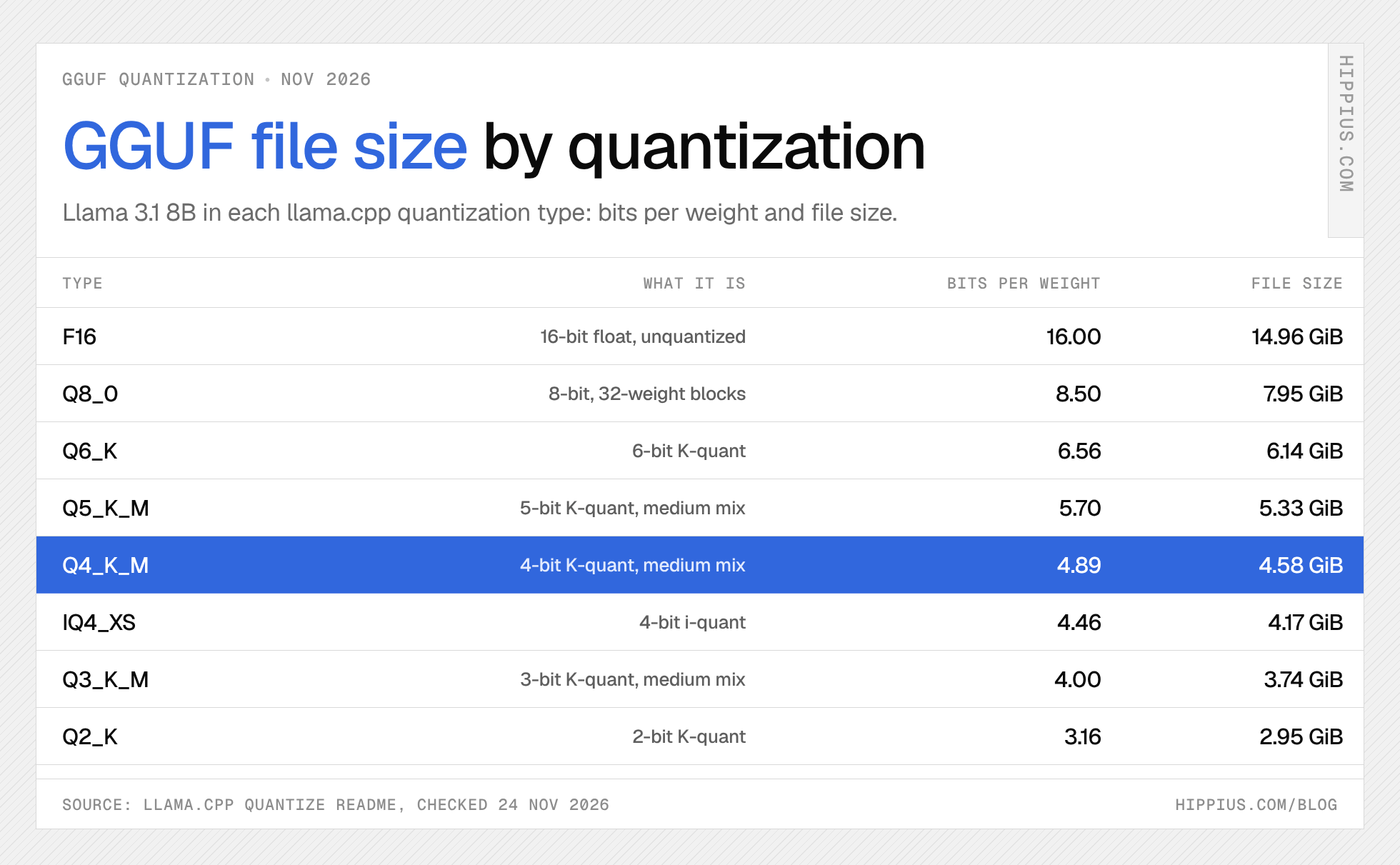
| Type | What it is | Bits per weight | Llama 3.1 8B file size | When to use it |
|---|---|---|---|---|
| F16 | 16-bit float, unquantized | 16.00 | 14.96 GiB | Converting or re-quantizing |
| Q8_0 | 8-bit, blocks of 32 weights | 8.50 | 7.95 GiB | The most precise quantized type here |
| Q6_K | 6-bit K-quant | 6.56 | 6.14 GiB | A step down from Q8_0 |
| Q5_K_M | 5-bit K-quant, medium mix | 5.70 | 5.33 GiB | More precision than 4-bit, smaller than Q6_K |
| Q4_K_M | 4-bit K-quant, medium mix | 4.89 | 4.58 GiB | A middle size, about a third of F16 |
| IQ4_XS | 4-bit i-quant | 4.46 | 4.17 GiB | A smaller 4-bit when Q4_K_M doesn't quite fit |
| Q3_K_M | 3-bit K-quant, medium mix | 4.00 | 3.74 GiB | Tight memory |
| Q2_K | 2-bit K-quant | 3.16 | 2.95 GiB | Only when nothing larger fits |
Bits per weight and sizes are llama.cpp's own measurements for meta-llama/Llama-3.1-8B in its quantize README, checked 24 November 2026. Sizes are in GiB (1 GiB is 1.074 GB). Mixed types average above their headline bit width because some tensors are kept at higher precision.
You can estimate any file yourself: parameters times bits per weight, divided by 8, gives bytes. Llama 3.1 8B has about 8.03 billion parameters, so Q4_K_M is 8.03 billion × 4.8944 ÷ 8 = 4.91 billion bytes, which is 4.58 GiB, matching llama.cpp's table. A 70B model at the same quantization is roughly nine times larger.
Which GGUF file should I download?
Download the largest quantization whose file fits in your RAM, or your GPU's VRAM if you're offloading to a GPU, with room left over for the context and your operating system. Plan for the whole file to fit, since the context cache grows on top of it as conversations get longer.
- Find the file size in the repository's file list, or estimate it with the sum above.
- Compare it with your memory. On an Apple Silicon Mac, RAM and GPU memory are shared, so count your total RAM. On a PC with a GPU, count the GPU's VRAM for layers you offload and system RAM for the rest.
- Start at Q4_K_M. It's the middle of the range, about a third of the F16 size, with the K-quant medium mix protecting the most sensitive tensors. Move up to Q5_K_M, Q6_K or Q8_0 if you have memory to spare; move down to IQ4_XS or Q3_K_M only if Q4_K_M won't fit.
- When memory is tight, compare options on your own prompts. A smaller model at Q4_K_M and a larger model at Q2_K can be a similar size, and which works better depends on the models.
For Llama 3.1 8B, that means: Q4_K_M at 4.58 GiB leaves headroom on a 16 GB machine, Q8_0 at 7.95 GiB needs a comfortable margin above 8 GB, and the F16 file at 14.96 GiB is more than a 16 GB machine can comfortably hold.
GGUF vs safetensors
GGUF is for running quantized models locally on CPUs, Apple Silicon and consumer GPUs; safetensors is for storing tensors, usually at full precision, for training, fine-tuning and GPU serving. Neither is better in general: they serve different stages of a model's life.
| GGUF | Safetensors | |
|---|---|---|
| What it's for | Local inference | Storing and sharing tensors |
| What's in the file | Weights plus architecture, tokenizer and other metadata | Tensors by name; config and tokenizer are separate files |
| Precision | Usually quantized (Q8_0 down to 2-bit), F16 possible | Usually full or half precision (FP32, FP16, BF16) |
| Tools that read it | llama.cpp, Ollama, LM Studio, GPT4All; transformers via gguf_file | transformers, diffusers, vLLM and most PyTorch tooling |
| Typical use | A model on a laptop or desktop | Training, fine-tuning, GPU inference servers |
The safetensors docs describe it as a simple format for storing tensors safely, as opposed to pickle, and say it loads fast with zero-copy reads. A model in safetensors is usually a folder: one or more .safetensors files plus config.json and tokenizer files. Hugging Face's GGUF page makes the contrast directly: unlike tensor-only formats such as safetensors, GGUF encodes both the tensors and a standardized set of metadata.
In practice, models are usually released in safetensors, and the community converts them to GGUF for local use. Is GGUF better than safetensors? For running a model on your own machine with llama.cpp or Ollama, yes; for training or full-precision serving on GPUs, safetensors is the format to use.
Where to download GGUF models
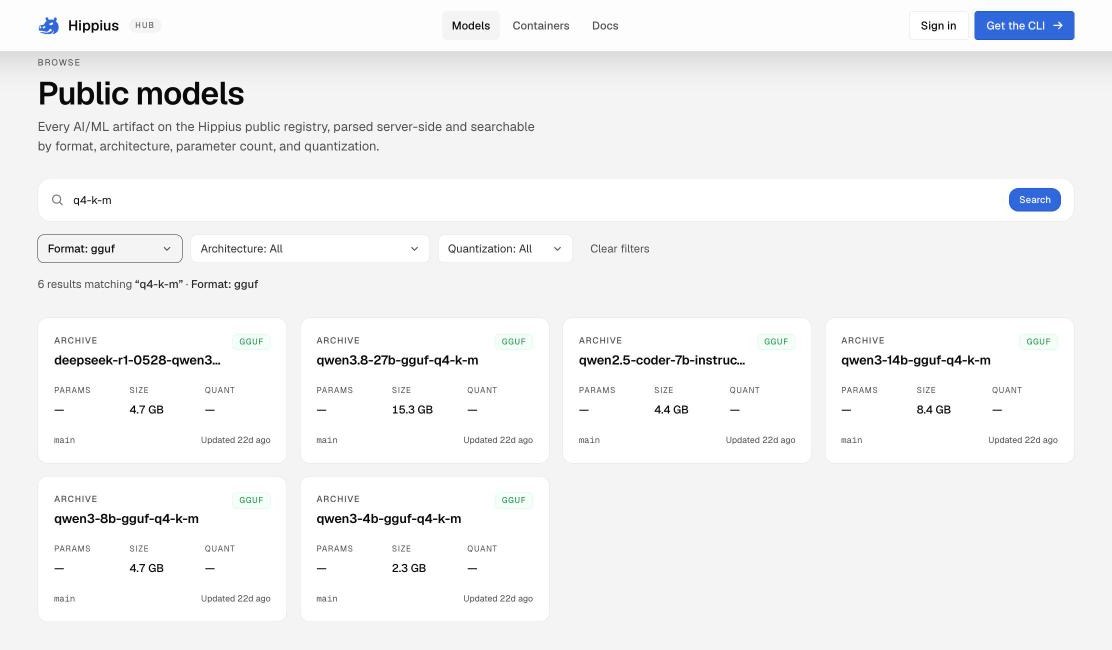
Most GGUF files are published on Hugging Face, usually in repositories named with a -GGUF suffix; on Hippius Hub you can filter public models to the GGUF format, search by quantization name such as "q4-k-m", and pull a file with the same hf_hub_download code (checked 24 November 2026).
Hugging Face is where nearly every GGUF release appears, often from the model's own publisher or from community quantizers who post every quantization of a model in one repository. You can browse them with the GGUF library filter, open any file to see its metadata and tensor types in Hugging Face's viewer, and convert a model yourself with the gguf-my-repo Space.
Hippius Hub is a model and container registry with a public catalogue that lists each model by format, so you can filter to GGUF and search by name. On 24 November 2026, filtering the public catalogue to GGUF and searching for "q4-k-m" returned six Q4_K_M mirrors, including Qwen3 4B, 8B and 14B, Qwen2.5-Coder 7B Instruct and a DeepSeek R1 distill. You can browse GGUF models on Hippius Hub, or push your own quantized files to a private namespace; the free plan includes 25 GB private and 100 GB public storage.
Hub's Python client mirrors huggingface_hub's function names and cache layout, so scripts that already download from Hugging Face need only a changed import. If you're weighing where to host models, our guide to Hugging Face alternatives compares the options.
How to download and run a GGUF file
Download only the file you need. GGUF repositories often hold a dozen quantizations of the same model, so pull just the one you need. With the huggingface_hub Python library:
from huggingface_hub import hf_hub_download

path = hf_hub_download(
    repo_id="Qwen/Qwen2.5-Coder-7B-Instruct-GGUF",
    filename="qwen2.5-coder-7b-instruct-q4_k_m.gguf",
)
print(path)
From Hippius Hub, install the client with pip install hippius_hub, then change the import and the repository; the rest of the call is the same:
from hippius_hub import hf_hub_download

path = hf_hub_download(
    repo_id="archive/qwen2.5-coder-7b-instruct-gguf-q4-k-m",
    filename="qwen2.5-coder-7b-instruct-q4_k_m.gguf",
    revision="main",
)
print(path)
To fetch every file that matches a pattern, snapshot_download with allow_patterns=["*q4_k_m*.gguf"] works the same way. Match the repository's capitalisation, because patterns are case-sensitive, and note that some repositories also hold split copies of the same file, so a pattern can download about twice the data. For one file, hf_hub_download is the better choice.
Run it with llama.cpp. llama.cpp's README installs with one command on macOS and Linux, then runs a model straight from a Hugging Face repository:
curl -LsSf https://llama.app/install.sh | sh
llama cli -hf ggml-org/Qwen3.5-0.8B-GGUF
llama serve -hf with the same repository starts a local server with a web interface. On Windows, the README's PowerShell installer is irm https://llama.app/install.ps1 | iex.
Or load it into Ollama. Ollama's import guide uses a Modelfile that points at your downloaded file:
FROM /path/to/file.gguf
Then run ollama create my-model in the same folder, and ollama run my-model to chat with it.
Convert a model yourself. If a model is only published in safetensors, llama.cpp's quantize README shows the two steps: convert_hf_to_gguf.py writes a full-precision GGUF, and llama-quantize shrinks it to the type you want.
python convert_hf_to_gguf.py --outfile gemma-4-E2B-it-bf16.gguf --outtype bf16 --remote google/gemma-4-E2B-it
./build/bin/llama-quantize gemma-4-E2B-it-bf16.gguf gemma-4-E2B-it-Q4_K_M.gguf Q4_K_M
Common questions about GGUF
What is GGUF?
GGUF is a single-file format for running large language models locally. It holds the model's weights, usually quantized, plus metadata such as the architecture and tokenizer, and it's the format read by llama.cpp, Ollama and LM Studio. As of November 2026 the format is at version 3, defined in the ggml repository.
What does Q4_K_M mean?
Q4_K_M means 4-bit weights quantized with llama.cpp's K-quant method in the medium mix, which in llama.cpp's original design keeps some sensitive tensors at 6 bits, and averages about 4.9 bits per weight. It cuts Llama 3.1 8B from 14.96 GiB to 4.58 GiB. On Hippius Hub you can find Q4_K_M GGUF files by filtering to GGUF and searching for "q4-k-m".
Is GGUF the same as GGML?
No. GGML is the C tensor library that llama.cpp is built on, and it was also the name of the earlier model file format. GGUF replaced the GGML, GGMF and GGJT file formats with a typed key-value metadata layout, so new model information can be added without breaking older files.
GGUF vs safetensors: which should I use?
Use GGUF to run a quantized model on your own machine with llama.cpp, Ollama or LM Studio. Use safetensors for training, fine-tuning and serving full-precision weights on GPUs with transformers or vLLM. Models are usually released in safetensors and converted to GGUF for local use.
How much RAM do I need for a Q4_K_M model?
At least the file size plus room for the context cache and your operating system. A Q4_K_M file is roughly the parameter count times 4.9 bits, divided by 8: 4.58 GiB for Llama 3.1 8B, according to llama.cpp's own measurements. The context cache grows with conversation length on top of that.
Where can I download GGUF models?
Most GGUF files are published on Hugging Face, usually in repositories named with a -GGUF suffix. On Hippius Hub you can filter public models to GGUF, search by quantization name such as "q4-k-m", and pull a file with the same hf_hub_download code, as of 24 November 2026.
Can I convert safetensors to GGUF?
Yes. llama.cpp's convert_hf_to_gguf.py script turns a Hugging Face model into a full-precision GGUF file, and llama-quantize then shrinks it to a type such as Q4_K_M. Hugging Face's gguf-my-repo Space does both steps in the browser.
TL;DR
GGUF is a single-file format that packs a model's weights and loading metadata together for local inference with llama.cpp, Ollama and LM Studio. Names like Q4_K_M describe the quantization: 4-bit K-quant, medium mix, about 4.9 bits per weight, or 4.58 GiB for Llama 3.1 8B. Download the largest quantization that fits in your memory with room to spare, starting from Q4_K_M, and use safetensors instead for training and GPU serving. Most GGUF files live on Hugging Face, and you can also filter and pull them on Hippius Hub.
About Hippius
Hippius is a distributed cloud platform built to give users a verifiable alternative to providers like AWS and Google Cloud. Files are encrypted and distributed across an independent network rather than held in a single provider's data center. Every storage claim, payment, and miner action is recorded on Hippius's own blockchain, so instead of asking users to trust the platform, Hippius lets them check it for themselves. On top of that foundation sits a full product suite: personal cloud storage, S3-compatible object storage with no egress fees, a CDN that serves stored files from the edge, confidential computing on secure hardware, and a container and model registry for AI.
Website | Discord | Twitter | Docs | Blog | Medium | Forum | Github | LinkedIn