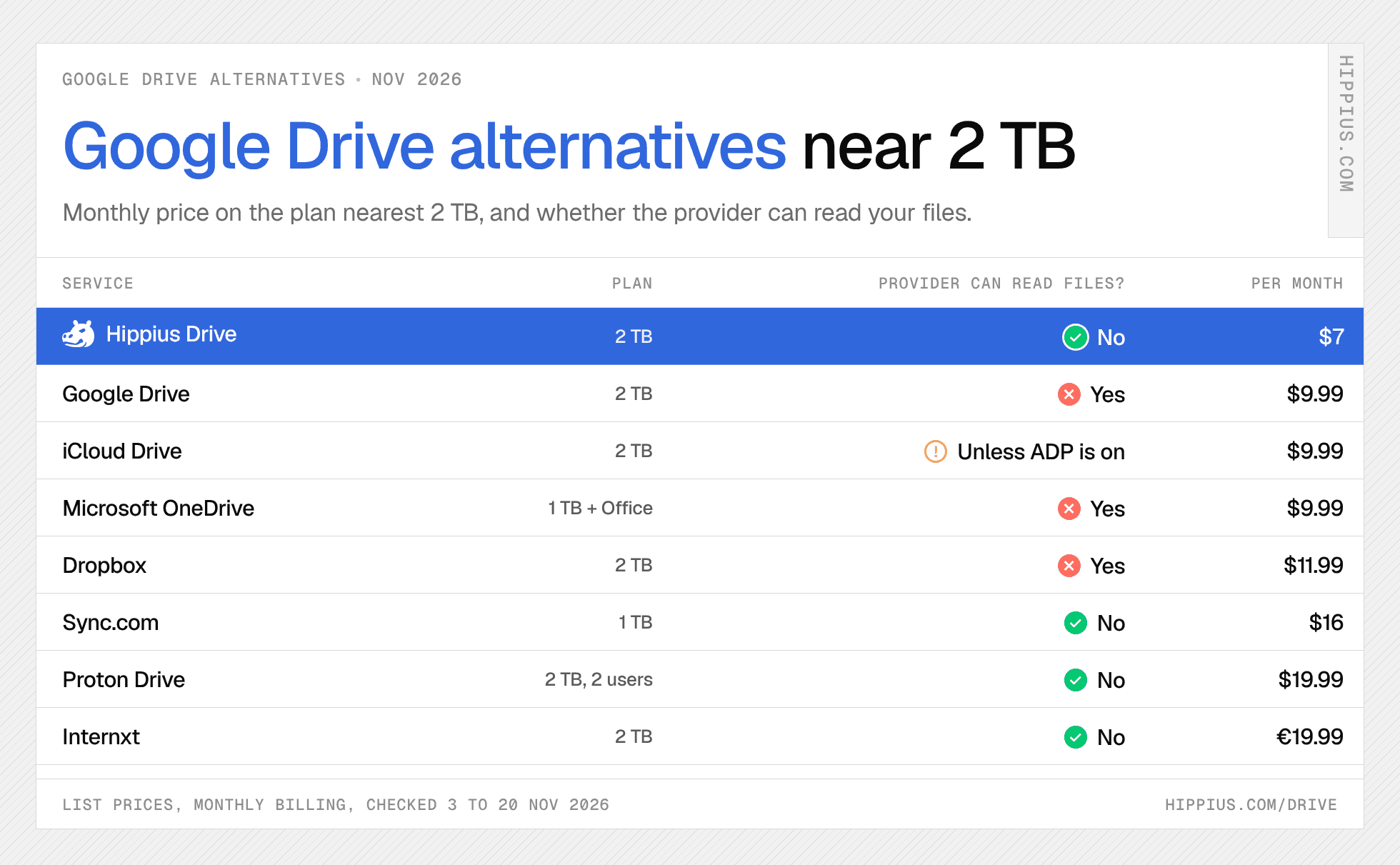
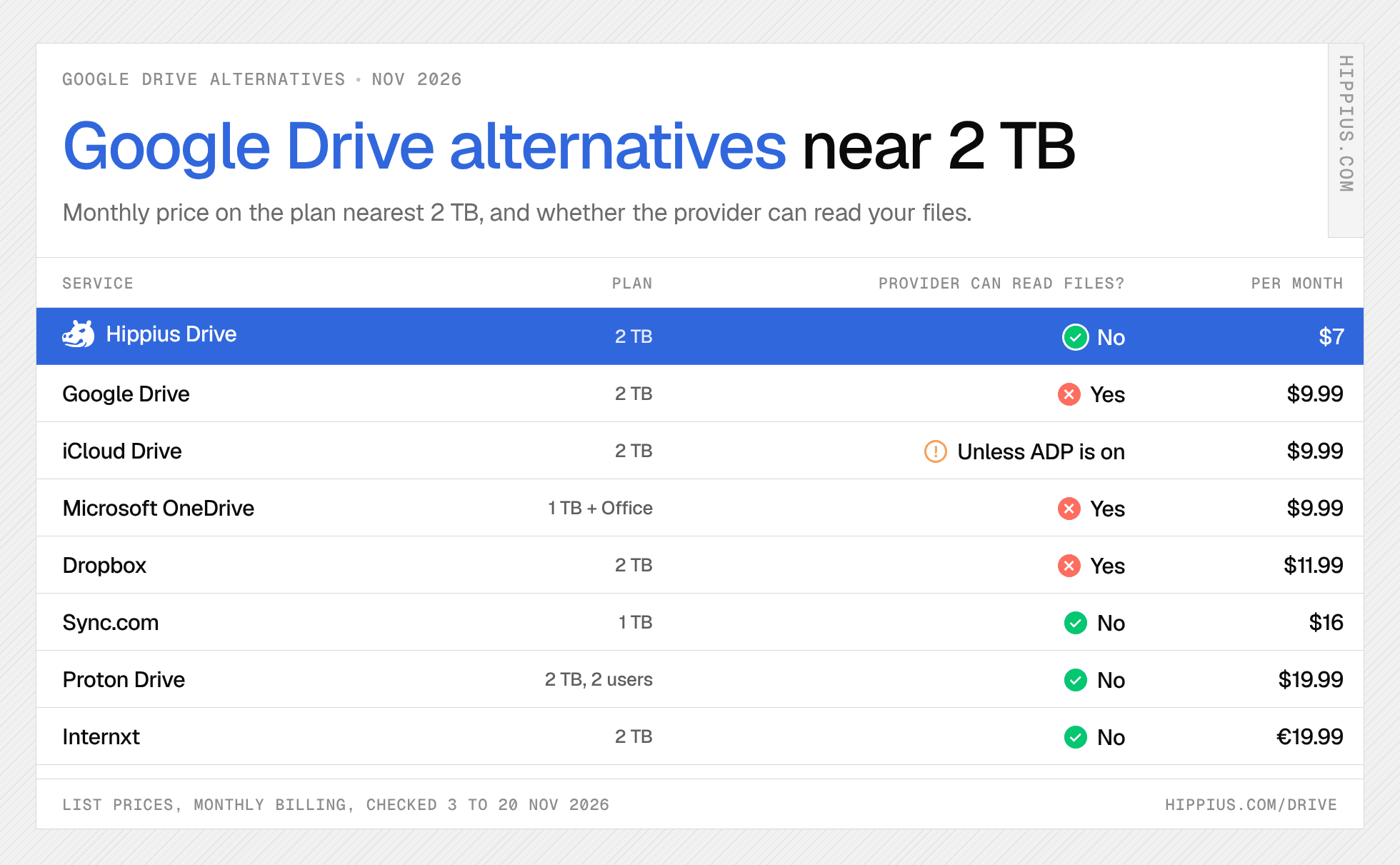
The best private Google Drive alternatives for people leaving Google, compared on who can read your files, what you'd lose and how to move, checked 20 November 2026.
Prices checked 20 November 2026. The best private Google Drive alternative is Hippius Drive: Google holds the keys to your Drive, while Hippius Drive encrypts every file on your device, so Hippius can't read your files, and 2 TB costs $7 a month against $9.99 on Google. If you need Word and Excel in place of Docs and Sheets, Microsoft OneDrive is the natural switch; iPhone and Mac households will find iCloud Drive simplest; Proton Drive suits people moving their mail and documents too; and Nextcloud is for those who want to run their own server. What you give up by leaving Google is editing and collaborating on documents inside your storage, so decide first where your documents will live.
| Service | Who can read your files | Free storage | About 2 TB a month | Document editing | Photo backup | Checked |
|---|---|---|---|---|---|---|
| Hippius Drive | ✅ Only you | 10 GB | $7 (2 TB) | Previews only | Yes, automatic on iPhone and Android | 20 Nov 2026 |
| Proton Drive | ✅ Only you | 5 GB | $19.99 (2 TB, 2 users, with mail and VPN) | Yes, Proton Docs and Sheets | Yes | 3 Nov 2026 |
| Sync.com | ✅ Only you, with some server-side previews | 5 GB | $16 (1 TB) | With an Office 365 licence | Yes | 3 Nov 2026 |
| Internxt | ✅ Only you | 1 GB | €19.99 (2 TB, annual term) | No | Not confirmed | 20 Nov 2026 |
| Microsoft OneDrive | ❌ Microsoft holds the keys | 5 GB | $9.99 (1 TB, with Microsoft 365) | Yes, Word, Excel and PowerPoint | Yes | 20 Nov 2026 |
| Dropbox | ❌ Dropbox holds the keys | 2 GB | $11.99 (2 TB) | Online documents and PDF editing | Yes | 20 Nov 2026 |
| iCloud Drive | ⚠️ Apple holds the keys unless Advanced Data Protection is on | 5 GB | $9.99 (2 TB) | Yes, Pages, Numbers and Keynote | Yes, built into iPhone | 20 Nov 2026 |
| Nextcloud | You, on your own server | Free software | Your own hardware | Yes, Nextcloud Office | Yes | 20 Nov 2026 |
| Google Drive (baseline) | ❌ Google holds the keys | 15 GB, shared with Gmail and Photos | $9.99 (2 TB) | Yes, Docs, Sheets and Slides | Yes, Google Photos | 20 Nov 2026 |
Method: US list price on monthly billing for the plan nearest 2 TB, before tax, in euros where the provider bills in euros, checked 20 November 2026, except Proton's monthly price and Sync.com's free tier, last confirmed on 3 November. ✅ the provider can't read your files; ⚠️ only with an opt-in setting; ❌ the provider holds the keys. MEGA, Tresorit and pCloud are compared in our secure cloud storage guide, linked below.
Contents
- Is Google Drive private?
- What you give up by leaving Google
- How to choose a Google Drive alternative
- The best Google Drive alternatives
- How to move from Google Drive
- Common questions about Google Drive alternatives
Is Google Drive private?
Google encrypts Drive files but holds the keys, so it can access them; zero-knowledge services such as Hippius Drive ($7 a month for 2 TB, checked 20 November 2026) encrypt on your device, so the provider can't.
Google's Drive help page says files are encrypted in transit and at rest with AES-256, which protects them from outside attackers. Google's terms of service say its licence to your content includes "using automated systems and algorithms to analyze your content", starting with spam, malware and illegal content, as content is sent, received and stored. That analysis also powers features people like, such as searching inside documents and grouping photos.
Google does offer end-to-end encryption, called client-side encryption, but only on Workspace Frontline Plus, Enterprise Plus, Education Standard and Education Plus, switched on by an administrator. Personal accounts and Google One plans don't get it.
What you give up by leaving Google
What you lose by leaving Google Drive, as of November 2026, is editing and collaborating on Docs, Sheets and Slides inside your storage, plus the single 15 GB pool shared with Gmail and Photos; files, folders and photo backup move across to most alternatives without much trouble.
- Docs, Sheets and Slides. Google's editors save straight into Drive. Most private storage, Hippius Drive included, stores and previews documents but doesn't edit them. Switchers who edit every day pick OneDrive (Word, Excel, PowerPoint), Proton Drive (Proton Docs and Sheets) or Nextcloud (Nextcloud Office), or keep a separate editor and move only their files.
- Real-time collaboration. Several people typing in one document at once is Google's strongest feature and the hardest to replace with zero-knowledge storage. Teams that depend on it usually keep live documents in a shared editor and store finished files somewhere private.
- One storage pool for Gmail, Photos and Drive. Leaving Drive doesn't move your mail. Many people keep Gmail and move files and photos only, which can let them drop to Google's free 15 GB.
- Android backup. Android phones back up settings, apps and messages to your Google account. That stays with Google whatever storage you pick; an alternative takes over your file and photo backup, and the phone backup stays separate.
- Workspace admin. If your company runs Google Workspace, Drive comes with user management, sharing policies and retention. Replacing that is a business migration, and OneDrive, Dropbox and Proton's business plans are the usual destinations.
- Search inside files. Google can search the text of your documents because it can read them. Zero-knowledge services mostly search file names.
If you live in Google Docs all day with a team, switching storage alone won't change much. If Drive is mainly where your files, photos and backups sit, a private alternative covers that well.
How to choose a Google Drive alternative
Start from what you use Google Drive for:
- Files, folders and backups only: a private drive. Hippius Drive gives 2 TB for $7 a month; Proton, Sync.com and Internxt are the other zero-knowledge options here.
- Docs and Sheets every day: OneDrive with Microsoft 365, or Proton Drive with Proton Docs and Sheets if you want the editor encrypted too.
- Photos from your phone: a service with automatic camera uploads. Hippius Drive, Proton, Sync.com, OneDrive, Dropbox and iCloud all do it.
- An iPhone and Mac household: iCloud Drive, with Advanced Data Protection turned on for end-to-end encryption.
- Running your own: Nextcloud on a home server or NAS.
On privacy alone, the question is who holds the keys. Our best secure cloud storage comparison covers that in depth, and cloud storage pricing compares price per TB across more plans.
The best Google Drive alternatives
Hippius Drive: best private alternative to Google Drive
Replaces: Google Drive files and folders, Google Photos backup, and shared Drive folders. Doesn't replace: Docs, Sheets and Slides.
Hippius Drive encrypts every file on your device before it uploads, and only you hold the key, so we can't read your files. The key comes from a 12-word recovery seed sealed by an unlock password that never leaves your device; our guide to zero-knowledge encryption explains why Drive asks for it.
Hippius Drive pricing, checked 20 November 2026, is monthly: Free 10 GB with Google, GitHub or Apple sign-in and no card, Starter $4 for 500 GB, Plus $7 for 2 TB, Max $22 for 10 TB and Scale $50 for 25 TB. Cancel any time: accounts signed in with Google, GitHub or Apple drop back to the free 10 GB, and if you store more than that, uploads pause and nothing is deleted.
How it covers what you used Google for:
- Drive on your computer: the desktop app for Windows, Mac and Linux syncs the folders you choose and backs up your laptop, encrypted on your computer.
- Google Photos backup: the mobile app for iPhone and Android backs up your camera roll automatically, encrypted on the phone before it leaves.
- Shared folders: shared drives on Plus, Max and Scale give family or a team Viewer, Editor and Manager roles, still encrypted end to end, and read-only links work for anyone without an account.
- Opening files in the browser: previews for images, video, PDF, Word, Excel, PowerPoint, CSV and text, decrypted on your own device.
Moving in: export with Google Takeout, then add the folder to the desktop app (steps below). There's no direct Google Drive import.
The honest limits: Hippius Drive is storage, so keep an editor for documents. The web console uploads files up to 100 MB each; larger files go through the desktop app. Hippius hasn't published an independent security audit of Drive yet. And if you lose both your password and your 12-word seed, nobody can recover your files.
Proton Drive: best for leaving Google completely
Replaces: Drive, Photos backup, Docs and Sheets, and with Proton Mail, Gmail. Doesn't replace: Slides, or Google-level real-time editing.
Proton Drive encrypts files and file names on your device, and Proton can't read them. It's the closest like-for-like swap for someone moving their whole Google account, because Proton also offers encrypted mail, calendar and its own editors, Proton Docs and Proton Sheets. There's no 2 TB plan for one person: Proton Duo gives 2 TB for two users with mail and VPN, at $19.99 a month on monthly billing or $14.99 a month billed yearly. The free plan is 5 GB. Desktop apps cover Windows and Mac, with a command-line tool for Linux. Proton is based in Switzerland. Moving in: Proton's own guide uses Google Takeout, then the desktop app.
Is Proton Drive better than Google Drive? For privacy, yes, since Proton can't read your files and Google can. Google is cheaper and better for collaboration: 2 TB costs $9.99 on Google against $19.99 for Proton Duo, and Google Docs has stronger real-time editing than Proton Docs.
Sync.com: best for large plans with encryption on by default
Replaces: Drive files and Photos backup. Doesn't replace: Docs and Sheets, unless you pay for Office 365.
Sync.com encrypts core storage end to end by default; its privacy policy notes that some preview, thumbnail and link features involve processing on Sync's side. There's no 2 TB plan: Personal 1 TB is $16 a month and Solo 5 TB is $32 on monthly billing, with 25% off the first year. It can open and edit Office files with an Office 365 licence. Sync.com is Canadian, with apps for Windows, Mac, iPhone and Android and no Linux app. Moving in: Takeout, then drag the folder into the Sync desktop folder.
Internxt: best open-source option from the EU
Replaces: Drive files. Doesn't replace: Docs and Sheets.
Internxt encrypts files on your device, says its code is open source and is based in Spain. Premium, with 2 TB, costs €19.99 a month on a 12-month term charged monthly, with a cheaper first month; lifetime plans are also sold. The free plan is 1 GB. Apps cover Windows, Mac, Linux, iPhone and Android. Moving in: Takeout, then upload through the desktop app.
Microsoft OneDrive: best for Word and Excel users
Replaces: Drive, Photos backup, and Docs, Sheets and Slides with Word, Excel and PowerPoint. Doesn't replace: privacy; Microsoft holds the keys.
Microsoft OneDrive is where most people go when they want an office suite in place of Google's. Microsoft 365 Personal gives 1 TB plus the Office apps for $9.99 a month, Basic gives 100 GB for $1.99, and the free plan is 5 GB. Real-time co-editing in Word and Excel is the nearest match to Google Docs. Its Personal Vault adds an extra sign-in step for chosen files, but isn't end-to-end encryption, and there's no official Linux app. Moving in: Google Takeout can deliver your archive straight to OneDrive.
Dropbox: best for sharing large files
Replaces: Drive, Photos backup and file sharing. Doesn't replace: a full office suite, or privacy; Dropbox holds the keys.
Dropbox Plus gives 2 TB for $11.99 a month on monthly billing, with 30 days to restore deleted files, transfers up to 50 GB, online documents and PDF editing, and apps for every platform including Linux. The free Basic plan is 2 GB. Dropbox encrypts stored files with 256-bit AES and holds the keys; end-to-end encryption is listed only on its Advanced business plan. Moving in: Google Takeout can deliver your archive straight to Dropbox.
iCloud Drive: best for iPhone and Mac households
Replaces: Drive, Photos backup, and Docs and Sheets with Pages, Numbers and Keynote. Doesn't replace: Android or Linux use.
iCloud is already on every iPhone and Mac. iCloud+ costs $9.99 a month for 2 TB in the US, shareable with up to five family members, and the free tier is 5 GB. By default Apple holds the keys; Advanced Data Protection, an opt-in setting, extends end-to-end encryption to iCloud Drive and Photos. There's a Windows app and no Android or Linux app. Moving in: Apple and Google offer a direct transfer from Google Photos to iCloud Photos, though Apple notes it can't import while Advanced Data Protection is on, so transfer first and switch it on afterwards. Drive files go through Takeout.
Nextcloud: best if you want to run your own
Replaces: Drive, Photos backup, Docs and Sheets (with Nextcloud Office), plus calendar and contacts. Doesn't replace: someone else doing the maintenance.
Nextcloud is open-source software you install on your own server or a home NAS, so the only one holding your files is you. Apps cover Windows, Mac, Linux, iPhone and Android, with automatic photo upload. Nextcloud GmbH is based in Germany and sells enterprise support to organisations. The trade-off is that you look after the hardware, backups and updates. Moving in: Takeout, then the Nextcloud desktop client.
How to move from Google Drive
- Open Google Takeout, click Deselect all, and tick Drive.
- Choose export formats for Docs, Sheets and Slides. Pick Word (.docx), Excel (.xlsx) and PowerPoint (.pptx) so they open in other editors and preview in Hippius Drive.
- Pick a delivery method and archive size. A download link works for any service; Takeout can also send the archive straight to Dropbox, OneDrive or Box. Choosing a 50 GB archive size means fewer parts to unzip.
- Unzip into one folder and check that the folder structure looks right.
- Upload with the desktop app. On Hippius Drive, add the folder to sync in the desktop app, which encrypts and uploads each file with no 100 MB limit.
- Export Google Photos separately. Run a second Takeout with only Google Photos, then add that folder too. Going forward, turn on camera uploads in the new mobile app. Moving to iCloud, use the direct Google Photos transfer instead.
- Rebuild shared folders as shared drives. Shared links stay with Google, so recreate each shared folder (on Hippius Drive, as a shared drive on Plus or above) and invite the same people.
- Copy files other people shared with you. Takeout may not include files other people shared with you, so download anything you need from "Shared with me" before you leave.
- Check, then clean up. Once files open correctly in their new home, delete them from Google Drive or drop to Google's free 15 GB.
Import routes for each service are listed in its section above.
Common questions about Google Drive alternatives
What is the best alternative to Google Drive?
For privacy, Hippius Drive is the best alternative to Google Drive as of 20 November 2026: it encrypts files on your device so Hippius can't read them, and 2 TB costs $7 a month against $9.99 on Google. For Word and Excel users it's OneDrive, for iPhone households iCloud, and for a full Google replacement with mail and documents, Proton.
Is Google Drive private?
Google encrypts Drive files but holds the keys, so it can access them; zero-knowledge services such as Hippius Drive ($7 a month for 2 TB, checked 20 November 2026) encrypt on your device, so the provider can't. Google's end-to-end client-side encryption is only on some Workspace business and education editions.
Can Google see my Google Drive files?
Google's systems can. Google holds the encryption keys for personal Drive accounts, and its terms say automated systems analyse content as it's sent, received and stored, for example to detect spam, malware and illegal content. Whether staff can look is a matter of Google's policies, since encryption doesn't stop it.
What is the best free Google Drive alternative?
Among the services compared here, none beats Google's own 15 GB free. MEGA, compared in our secure cloud storage guide, gives 20 GB, and Hippius Drive gives 10 GB, private, with no card, as of 20 November 2026. Proton Drive, Sync.com, OneDrive and iCloud give 5 GB, and Dropbox 2 GB.
Is Proton Drive better than Google Drive?
For privacy, yes: Proton encrypts files on your device and can't read them, while Google holds the keys. Google is cheaper and better for collaboration: on 20 November 2026, 2 TB cost $9.99 a month on Google against $19.99 for Proton Duo (2 TB for two users), and Google Docs has stronger real-time editing.
How do I move my files from Google Drive?
Export Drive with Google Takeout, choosing Word, Excel and PowerPoint formats for your Docs, Sheets and Slides, then unzip the archive and add the folder to the new service's desktop app. Export Google Photos as a separate archive, recreate shared folders, and download anything you need from "Shared with me", since Takeout may not include files other people shared with you.
Can I still use Google Docs if I leave Google Drive?
Yes. Many people keep a free Google account for Docs and Gmail and move their files and photos to private storage. Docs you write still live in Google's storage, so download finished documents as Word files if you want them kept privately.
Is there a Google Drive alternative with document editing?
Yes. Microsoft OneDrive comes with Word, Excel and PowerPoint, Proton Drive has encrypted Proton Docs and Sheets, iCloud has Pages, Numbers and Keynote, and Nextcloud has Nextcloud Office on your own server. Sync.com edits Office files with an Office 365 licence. Hippius Drive previews documents but doesn't edit them.
TL;DR
Google Drive is encrypted, but Google holds the keys, and end-to-end encryption is only on some Workspace plans. As of 20 November 2026, Hippius Drive is the best private alternative at $7 a month for 2 TB, with every file encrypted on your device. OneDrive suits Word and Excel users, iCloud suits iPhone households, Proton replaces Google most completely, and Nextcloud lets you run your own. The main thing you give up is editing documents inside your storage, so decide where your documents will live, then move your files with Google Takeout. Try Hippius Drive free with 10 GB and no card.
About Hippius
Hippius is a distributed cloud platform built to give users a verifiable alternative to providers like AWS and Google Cloud. Files are encrypted and distributed across an independent network rather than held in a single provider's data center. Every storage claim, payment, and miner action is recorded on Hippius's own blockchain, so instead of asking users to trust the platform, Hippius lets them check it for themselves. On top of that foundation sits a full product suite: personal cloud storage, S3-compatible object storage with no egress fees, a CDN that serves stored files from the edge, confidential computing on secure hardware, and a container and model registry for AI.
Website | Discord | Twitter | Docs | Blog | Medium | Forum | Github | LinkedIn